Sunday, May 21, 2006

More on MacBook Vista compatibility

In the last article I commented on potential Vista compatibility for the MacBook and said that judging by the specs, the MacBook should support Aero Glass on Windows Vista. Some further points:

1) Intel recommends Core Duo with the Intel 945 series chipsets (which utilizes GMA 950) for Vista compatibility.
2) The Intel Mac mini uses Intel 945, and presumably so does the MacBook (although we have not yet received confirmation of this).
3) Intel already has written a WDDM driver for Intel 945 on Vista.
4) Despite the fact that OS X allocates only 64/80 MB of system RAM for use by the GPU on the Mac mini, Windows XP allocates 256 MB (provided one has enough system RAM), which is more than sufficient for Vista even with large screens. It is clear that the Mac mini's 64/80 MB GPU RAM limitation is not a hardware limitation.
5) Not only was there that video showing GMA 950 support, PC World also confirmed full Aero Glass functionality on an Acer laptop with Intel 945.

So far I have not seen anyone who has tested Vista on the MacBook, but I'm sure that will come soon enough. It would be nice if someone could at least test the MacBook with the Windows Vista Upgrade Advisor, but unfortunately the download is no longer available.

[Update 2006-05-22]

The Windows Vista Upgrade Advisor is now back up.

Also, I have now confirmed that the MacBook uses the Intel 945GM chipset (which is not big surprise considering that's the chipset found in the Mac mini, and we already knew that the MacBook has the GMA 950). Intel has this to say about the chipset and Vista compatibility: "Mobile Intel® 945GM Express Chipset family platforms using 512MB of system memory or greater meet all current requirements for the Microsoft Windows Vista* Capable PC program."

[Update 2006-05-22]

c|net weighs in:
Last week, Microsoft released a test version of its "Upgrade Advisor," a downloadable tool that aims to tell users how Vista-ready their system is.

Ironically, the machine that was in the best shape for Vista, at least according to the tool, was a loaner Mac Mini with 1GB of memory. That system was Aero-ready, according to the tool, as long as I devoted more of the system's modest hard drive over to the Windows partition. It needed 15GB of the drive to be free, and most of the free space was over on the Mac side of the house.
Screengrabs of the Windows Vista Upgrade Advisor running on incompletely supported PCs are here.

Thursday, May 18, 2006

Windows Vista system requirements announced, MacBook fully supported

Microsoft today announced the system requirements for Windows Vista, its new operating system being developed to replace Windows XP:
A Windows Vista Capable PC includes at least:

A modern processor (at least 800MHz).
512 MB of system memory.
A graphics processor that is DirectX 9 capable.

Windows Vista Premium Ready PCs

To get an even better Windows Vista experience, including the Windows Aero user experience, ask for a Capable PC that is designated Premium Ready, or choose a PC that meets or exceeds the Premium Ready requirements described below. Features available in specific premium editions of Windows Vista, such as the ability to watch and record live TV, may require additional hardware.

A Windows Vista Premium Ready PC includes at least:

1 GHz 32-bit (x86) or 64-bit (x64) processor.
1 GB of system memory.
A graphics processor that runs Windows Aero.
128 MB of graphics memory.
40 GB of hard drive capacity with 15 GB free space.
DVD-ROM Drive.
Audio output capability.
Internet access capability.

Windows Vista Capable and Premium Ready footnotes

Windows Aero requires:
DirectX 9 class graphics processor that:
Supports a WDDM Driver.
Supports Pixel Shader 2.0 in hardware.
Supports 32 bits per pixel.
Adequate graphics memory.
64 MB of graphics memory to support a single monitor less than 1,310,720 pixels
128 MB of graphics memory to support a single monitor at resolutions from 1,310,720 to 2,304,000 pixels
256 MB of graphics memory to support a single monitor at resolutions higher than 2,304,000 pixels
Meets graphics memory bandwidth requirements, as assessed by Windows Vista Upgrade Advisor running on Windows XP

What this means is that the new 13" MacBook should be fully supported as a Windows Vista Premium Ready PC... errr... Mac, as long as 1 GB or more RAM is installed. The MacBook's integrated Intel GMA 950 graphics has the required features for Aero Glass, which includes things such as translucent windows elements. Proving this is this video which demonstrates a beta version of Windows Vista running with full Aero Glass functionality on Intel GMA 950.

Black MacBook may have problems with its matte finish

There is at least one report out there that states the finish on the matte black MacBook can flake off when scratched. If true, it is reminiscent of the famous paint chip problem of previous G4 Titanium PowerBooks.

Let's hope this is not a widespread problem, but if you're at all worried, you might want to buy the white version instead.

Wednesday, May 17, 2006

MacBook disassembled

Those crazy Japanese over at Kodawarisan have already disassembled a MacBook, and have lots of pictures to show.

As has been reported, the hard drive looks relatively easy to remove, even for an end user. This is in contrast to the previous iBooks, where removal of the hard drive was quite the endeavour.

The pricing for an Apple-supplied 80 GB hard drive for the MacBook is attractive, so it still makes sense to get that drive from Apple. However, a user who wishes to use a larger drive or faster 7200 rpm drive can purchase it separately and install it his/herself. I'm not sure how this affects the warranty however.

Tuesday, May 16, 2006

13" MacBook released, and it runs Aperture

Today, Apple released the long awaited 13" MacBook. To the surprise of many, the model debuted with a 1.83 GHz Core Duo CPU at the low end, and a 2.0 GHz Core Duo at the high end. That means that this little laptop will be roughly twice as fast in CPU performance as my G5 iMac 2.0 GHz, which is only 1 year old.
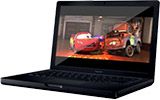
Besides the usual white plastic enclosure, the faster MacBook model also comes in black, although you have to pay extra for that privilege. (I chose instead to order a white MacBook Core Duo 2.0, configured similarly to the black model, for less money.)

Unfortunately, as many of us expected, this machine utilizes integrated graphics, Intel GMA 950, a less than stellar performing graphics chipset. However to our surprise, the MacBook runs Aperture. According to Joseph Schorr, the Senior Project Manager for Aperture at Apple, Aperture 1.1 will install and run on the new MacBook, although it is unsupported:
Yes, Aperture does run on the new MacBooks, but it is NOT officially supported, due to limitations with the graphics card. You're not disallowed from using it (no hacks needed) but you'll essentially be using it at your own risk. Your mileage will vary with the MacBook, depending on your workflow.

Aperture is, of course, fully supported on all MacBook PRO models.

Joe Schorr
Sr. Product Manager, Aperture
Apple
I applaud Apple for giving us this choice.

Speaking of choice, it's unfortunate that Apple has chosen to make us switch from matte LCD screens to the new glossy screen in the new MacBook. While purchasers of the new MacBook Pros can now choose from either matte or glossy screens, all MacBooks ship only with glossy screens. Users of the new MacBook already have noted that glare can be a problem with this new laptop in certain lighting. On the other hand, knowing that the previous 12" screen was average quality at best, perhaps this new screen offers better image quality, glare notwithstanding.

Overall, this new MacBook release was an excellent one, and I look forward to receiving my new MacBook soon.

Friday, May 05, 2006

The MacBook is imminent

Premature release?


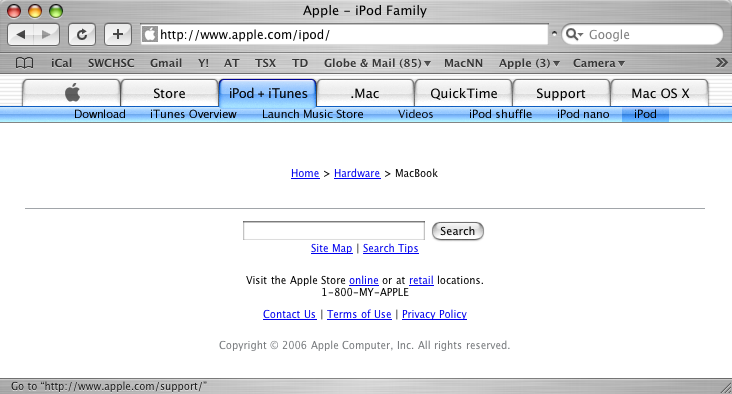
As you can see from the picture above (larger version), for some reason navigating to Apple's iPod page takes us to an empty "MacBook" (not "MacBook Pro") page.

[Update 2006-05-05]

Apple has now fixed the iPod page.