Thursday, October 26, 2006

Adobe Soundbooth: No PowerPC support, ever.

Adobe has announced a new sound editing application called Soundbooth, and has posted a free beta preview of the application. That's the good news. Now the bad news:
Will there be a PowerPC version?

No. Apple is quickly moving its focus towards Intel Macs, and no longer sells Power PC systems in many places. By focusing on Apple's future, we have been able to bring this powerful application to the Mac platform much more rapidly, and with a stronger feature set.
Visit the Adobe Intel Mac FAQ for more information.
That is extremely disappointing, especially considering that the vast majority of current Mac users have PowerPC Macs, and many stores (including Apple's own refurbished Mac store) still sell PowerPC Macs.

[Update 2006-10-30]

Adobe's John Nack responds:
Here's the reality: Apple's migration to Intel chips means that it's easier to develop for both Mac and Windows, because instead of splitting development resources optimizing for two different chip architectures, you can focus on just one. That's all good, and it makes Mac development more attractive. Users benefit from having developers' efforts go elsewhere (features, performance tuning, etc.), rather that into parallel, duplicate work. In the case of Soundbooth, the team could leverage Adobe's expertise in building great audio tools for Intel chips (namely Audition) to bring the app to market faster and with a richer feature set.

Thursday, October 19, 2006

Apple screws up, blames Microsoft

Apple yesterday admitted that they shipped a number of iPods to customers with a Windows worm on them, which infected several customers' PCs.

Instead of simply issuing a standard press release, Apple instead decided to throw in a dig at Microsoft:
As you might imagine, we are upset at Windows for not being more hardy against such viruses, and even more upset with ourselves for not catching it.
Jon Poon, who works for Microsoft scanning its software before it's released, was quick to respond:
Instead of focusing on how and why it was even included in the first place, the company that published a series of video ads, including this one, actual try to divert the blame on the Windows platform!

It's not a matter of which platform that the virus originated. The fact that it's found on the portable player means that there's an issue with how the quality checks, specifically the content check was done. This also indicates that through the manufacturing cycle, the base device from which the image was duplicated to the other devices in the manufacturing run, was connected to a PC that most probably did not have , and i quote their press release, "up to date anti-virus software which is included with most Windows computers".
Mr. Poon is absolutely correct. Apple's attempt to try to shift partial blame onto Microsoft, even if in jest, simply comes across as being unprofessional.

Wednesday, October 18, 2006

Apple holds 6.1% US computer market share

In Q4 2006, Apple had its best best quarterly Mac sales ever, with 1.61 million Macs sold. This propelled Apple to the #4 position in the US, with 6.1% US PC market share.

Apple closed at $74.53 today, but after the earnings announcement it jumped to over $78 in after-hours trading.

Wednesday, October 11, 2006

Handbrake now supports iPod 640x480 H.264

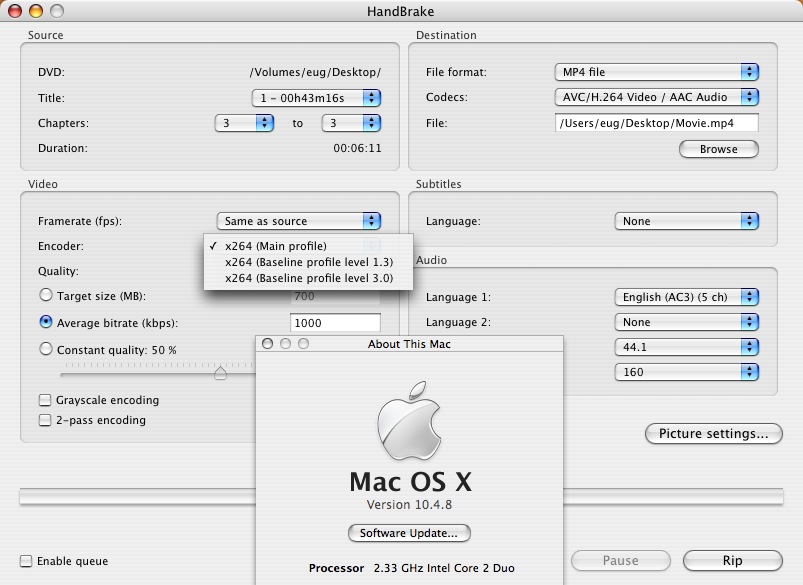
Earlier I lamented the lack of a version of Handbrake that could encode H.264 video up to 640x480 for the iPod. The iPod requires the baseline low complexity H.264 profile in order to be compatible with video at this resolution, but the current Handbrake 0.7.1 release does not support this profile.

Fortunately, there is ongoing development into Handbrake, and the latest development versions of the program now include this profile. The pre-release application is buggy, but it is very promising. I have confirmed it is able to create video that will play back fine on the iPod.


The profile in Handbrake is the x264 encoder's "Baseline profile level 3.0". Using this profile along with an image size of 640x480, an average video bitrate setting of ~1500 Kbps, and an average AAC audio bitrate of 160 Kbps will yield files that are fully compatible with iTunes and the latest iPods.


[Update 2006-10-11]

For widescreen 1.78:1 material, Handbrake defaults to 704x400. Unfortunately, this does not work with the iPod, since iTunes won't allow these files to be copied over to the iPod, despite the fact they are approximately 9% lower resolution than 640x480. However, both 640x368 (1.74:1) and 640x352 (1.82:1) work fine.

Thursday, October 05, 2006

Mac Cube DVD-ROM reads dual-layer DVD+R

I have finally had the chance to test DVD+R, DVD-R, dual-layer DVD+R, and dual-layer DVD-R in my Cube's original Matsushita SR-8186 DVD-ROM drive. This drive is using the Y213 firmware, which is a custom region free firmware, but otherwise it is the same as the usual SR-8186 firmware. Here are my results:

DVD-R: Works
DVD-R DL: Does not work*
DVD+R: Does not work
DVD+R bitset: Works
DVD+R DL: Does not work
DVD+R DL bitset: Works

* I have not tested many dual-layer DVD-R discs. So far I have tested only one brand, but it is readable in my other machines, including my 5 year-old Panasonic RP91 DVD player.

The reason the above information may be important is the issue of +R and dual-layer recordable DVD media. Most drives work with single-layer DVD-R natively, but many older drives won't work with single-layer DVD+R or dual-layer DVD media of any kind, when the media's book type is properly set. However, one can get both single and dual-layer DVD+R discs to work on these drives simply by changing their book type.

How does one set the +R book type to DVD-ROM? Unfortunately, only specific burners support this feature. Most will only set +R discs as +R, because that is what they are supposed to do. However, some will allow the user to choose which setting to use, and a few drives just default to the DVD-ROM setting for maximum compatibility. Since my iMac's and MacBook's Pioneer burners don't support bitsetting, I keep an external Firewire bitsetting drive around. It is a Pioneer DVR-110D flashed with a Buffalo bitsetting firmware.

If you need some further information on the various DVD formats, please check out my DVD recordable FAQ. I have not updated it in three years so it completely ignores dual-layer recordable media, but some of it still may be of help to some of you as a basic DVD primer. For more in-depth and up-to-date information, you should also check out Jim Taylor's DVD FAQ.

Friday, September 29, 2006

iPod Software 1.2 doubles battery life

Apple's recently released iPods have a claimed battery life of 3.5 hours for the 30 GB iPod and 6.5 hours for the 80 GB iPod. That's about double the claimed 2 and 3 hour battery life of the previous 30 GB and 60 GB models respectively.

It seems that much (if not all) of that battery life difference is due to software. The latest 1.2 iPod Software adds the new screen brightness adjustment feature to last year's iPod models, which in turn has markedly increased the battery life of these models as well.

I recently purchased a refurbished 30 GB 5G iPod (which is last year's model) to replace my dead iPod mini and have done some testing. With the screen brightness set about halfway to the left (about at the one quarter setting) and audio set at the mid setting, I got 3.5 hours usage out of it, which just so happens is exactly how long the new version is claimed to last. My iPod shut off after precisely 210 minutes of TV show viewing, just a little bit before the end of the fifth 43 minute episode. (These episodes were encoded using QuickTime 7.1.3 with 1.6 Mbps Baseline Low Complexity H.264, at 608x336 or 624x352. The files were just over 500 MB each.) The one quarter setting is perfect for a moderately dark environment, such as on a plane when the overhead lights are off.

I'm sure I could get the iPod to last around 4 hours if I reduced the screen to its lowest brightness setting. In fact there has been a report of an 5G iPod reaching almost 8 hours of playback with 320x240 H.264 video, after the 1.2 iPod update. The same iPod would only last about two hours previously, just as advertised, since the screen was always stuck at full brightness.

By the way, TV playback output is surprisingly good, if the source video is good. Despite the drawbacks of 1.6 Mbps Baseline Low Complexity H.264, it is still a dramatic improvement over the previous 320x240 video on a TV. One side note is that while the iPod uses a non-standard cable for the TV out, any comparable AV cable will do. One just needs to remember that the video signal from a standard AV cable will be on the red output, not the usual yellow output.

Better gaming with games from the iTunes Store is also a new feature in the iPod 1.2 Software. I purchased Pac Man, and besides a few upgrades to the menu features and screen layout, the game is essentially identical to the arcade version. However, controlling the game with the click wheel is a bit tough to get used to.

This latest iPod refresh has proven to be an excellent one, not just for those buying now, but also for those with the previous 5G iPods.