Saturday, September 10, 2005

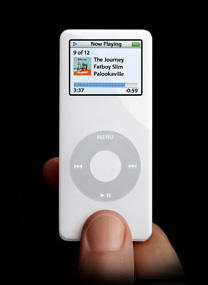
iPod nano: The beginning of the end of Firewire?


Apple's release of the iPod shuffle marked Apple's first iPod product without the support of Firewire. That was not totally unexpected however, considering the iPod shuffle is essentially a USB 2.0 pen drive that plays music as well. Implementing Firewire on such a product would have been quite problematic, given its overall design and form factor.

However, Apple has now released the iPod nano, the replacement to the very popular iPod mini, which also does not support Firewire synchronization. This is especially surprising considering it sports the normal iPod dock connector used in other units. One presumes that part of the reason for this is the iPod nano's very small size. The included chipset probably doesn't support Firewire, and adding full Firewire support would have meant a larger unit and higher cost.

Similarly, Apple's and Motorola's new ROKR iTunes phone doesn't support Firewire synchronization either.

It is somewhat unfortunate that Apple has gone this route. For fastest synchronization, USB 2.0 is required, but most of Apple's installed base of Macs do not support USB 2.0. (All currently shipping Macs do support USB 2.0 however.) Apple came late to the USB 2.0 party, but now has embraced it head-on at the expense of Firewire. Ironically, Firewire is a standard that Apple helped create.

The silver lining however is that synchronization of the iPod nano will still work on older Macs using USB 1.1 (albeit slowly), and the iPod nano is absolutely gorgeous. I want one... or three.

Thursday, August 18, 2005

Apple begins iMac G5 Repair Extension Program for Video and Power Issues

Apple today released a FAQ about their new iMac G5 Repair Extension Program for Video and Power Issues:
The iMac G5 Repair Extension Program for Video and Power Issues applies to first generation iMac G5 computers that have video or power-related issues as a result of a specific component failure. If your iMac G5 is exhibiting any of the symptoms listed below and your computer's serial number is within the noted ranges, your computer may be eligible for repair, free of charge. If Apple or an Authorized Apple Service Provider (AASP) determines that your iMac G5 computer is eligible as part of the program, the repair will be covered by Apple even if your iMac G5 is out of warranty. This is a worldwide Apple program.

Affected systems will exhibit one of the following video- or power-related symptoms :

Scrambled or distorted video
No video
No power

Note: If your iMac G5 is not experiencing any of these symptoms, you do not have to contact Apple or any Apple Authorized Service Provider.

Which iMac G5 computers are affected by the iMac G5 Repair Extension Program for Video and Power Issues?
The program is available for certain iMac G5 models that were sold between approximately September 2004 and June 2005 featuring 17- and 20-inch displays with 1.6GHz and 1.8GHz G5 processors.

The affected iMac G5 computers have serial numbers where the first 5 digits fall into the ranges noted below.

Serial Number ranges:

W8435 - W8522
QP435 - QP522
CK435 - CK522
YD435 - YD522

Somehow this all seems vaguely familiar.

[Update 2005-08-20]

The repair program includes the first G5 iMac models released in August 2004. It is not clear if the more recent G5 iMac models released in May 2005 are included. Newer 2.0 GHz iMacs do indeed fall into the serial number ranges, but Apple specifically leaves out 2.0 GHz model iMacs in the program description.

Wednesday, August 17, 2005

Apple's Security Update 2005-007 kills 64-bit support

Reports online state that apps that are compiled specifically for 64-bit G5 systems will no longer run after the latest Security Update 2005-007 in installed. Affected programs include many command line applications as well as the 64-bit version of Mathematica 5.2.

That something as obvious as this could be missed suggests that Apple really needs to revamp their software quality assurance program.

[Update 2005-08-18]

Apple has released Security Update 2005-007 Version 1.1 to correct the problem:

Security Update 2005-007 delivers a number of security enhancements and is recommended for all Macintosh users.

Security Update 2005-007 v1.1 replaces Security Update 2005-007 v1.0 for Tiger systems Mac OS X v10.4.2. Users who have already installed v1.0 on Tiger systems should install v1.1.

Security Update 2005-007 v1.1 provides a combined 32- and 64-bit version of LibSystem to replace the 32-bit version that was delivered in v1.0. No other changes have been made in version 1.1.

Monday, August 08, 2005

Core Image, Monitor Spanning, and the new iBook's Radeon 9550

Some of you asked about Core Image after we posted our previous article on the new iBooks released in July which sport the Radeon 9550. As we mentioned in our article updates, yes indeed it does fully support Core Image in hardware, and this is best demonstrated by the ability of the iBook to display the ripple effect in Dashboard:


(Click on picture for larger version.)

Update [2005-08-09]

The desktop spanning hack also works fine on the new iBooks. With Screen Spanning Doctor 0.3.3 I can extend my iBook's desktop onto an external 17" 1280x1024 LCD without any problems. I have not tried clamshell mode however, since I do not use this feature.

Two finger scrolling rocks my world

Although much of the recent scrolling hoopla is with Apple's new scrolling Mighty Mouse, I'm here to extoll the virtues two finger scrolling available with Apple's trackpads on their laptops.

Originally introduced with the last PowerBooks, Apple's two finger scrolling is now standard across all its laptops, so the last iBooks got it too. I have just purchased a 12" iBook and have come to love Apple's implementation of trackpad scrolling.

I have never liked the limited up/down scrolling on scroll mice, and didn't like the trackpad scrolling hacks with 3rd party apps either. Thus, I thought I wouldn't like trackpad scrolling, but it's a world of difference. Not only is it very smooth, but it also works in all directions. This is especially useful for large photographs, say for example in Preview or Safari. With two finger scrolling, I can scroll up, down, right, left, sideways, or even in circles. Diagonal and circular scrolling do not work quite as smoothly in Photoshop CS, but I'm sure it will improve with subsequent updates to Photoshop and/or the scrolling driver. (I have not yet tried Photoshop CS2 however.)

It's these little features that continue to make Apple's laptops so desirable.

Friday, August 05, 2005

G5 970FX 2.0 is 39 Watts max

IBM has published an article titled Thermal Considerations: PPC970FX which states the 2.0 GHz G5 has a maximum power output of 39 Watts (105 C part). This number is significantly lower than the 50 Watts listed for previous non-low power 2.0 GHz 970FX chips. Further details are not provided, but it could represent a specific low power version of the chip, which would be sold in parallel with higher power parts.

The question now is what wattage a low power 1.8 GHz 970FX and a 2.5 GHz 970MP would put out.