Evidenced by the shock and dismay out there, Apple's new draconian new iPhone OS 4.0 programming requirement seems like a big blow to independent developers. I can't claim to be an educated coder or anything like that, but even as an outsider, this sends shivers down my spine.
IANAL, but I have to wonder if the regulators could consider this anti-competitive.
P.S. Until today I had no interest whatsoever in Android. Now I think I'll have to take a closer look at Google's baby to see what all the fuss is about.
Friday, April 09, 2010
Monday, April 05, 2010
iPad hands on
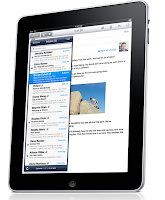 A colleague made the trek down south to the US of A and braved the Apple Store crowds to buy an iPad this weekend. As expected, the machine is sleek and feels well built, and really does look like a giant but sexier iPod touch.
Of course, the larger screen is a massive improvement for its functionality, as compared to the iPhone and iPod touch. Things are easy to read and the width in portrait mode is perfect to fit most standard documents and email messages. iPhoto's Multi-Touch capabilities are excellent, and are really sleekly implemented. The machine is responsive for surfing and email and in its current form factor could easily replace a laptop for this purpose. Embedded video in sites such as CNN.com work fine, but unfortunately, the lack of Adobe Flash support is still a major impediment on many other popular sites. For example, videos on my favourite news site, The Globe and Mail, are dependent upon Flash and therefore are not viewable on the iPad. Ironically, the first video I tried (and failed) to view was the Globe's iPad review.
Typing in portrait mode is somewhat annoying as it's too cramped for touch typing, but it's still a much, much better experience than on an iPhone. Touch typing in landscape mode is possible, but it would take some getting used to. I was constantly adding extra characters by accident, when my fingers inadvertently brushed the screen.
The iPad is light, but I would find it uncomfortable to hold in place like a book for hours on end. Not that I would anyway, since it suffers the same problems as laptop screens for reading. If you want an eBook reader you'd be better off getting a dedicated eBook reader. I personally prefer real paper though. Call me old school.
I did not have enough time to give iWork a good run through, but the apps look sleek on the machine. The iPad would probably make for a good on-the-road machine for Keynote presentations, but then again on the road I'd still be taking my MacBook Pro, making the iPad superfluous.
All in all, the iPad is a great start. I'm holding off for now though, and will adopt Microsoft's wait-and-see stance. In its current iteration, the iPad is not quite there yet (or the internet is not quite there yet depending on your perspective), so I see no need to drop a wad of cash on an iPad in 2010. Maybe later.
Wednesday, March 24, 2010
ING Canada releases iPhone banking app
ING Canada today released its banking application for the iPhone.
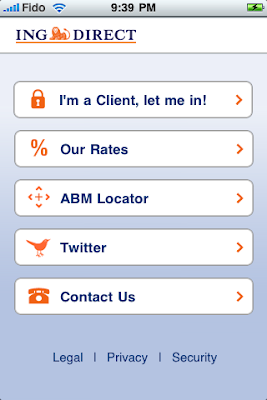
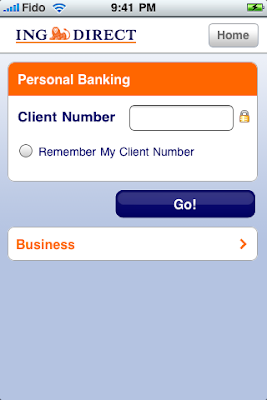
It is remarkably effective and easy to use, for accounts that have been previously set up online. Within minutes of installing the application I had already transferred some money from my ING account to a non-ING bank account. In fact, it was even simpler than online banking with some banks through Safari. No browser incompatibilities to worry about.
There was even an option for transferring either Canadian or US currency. I tried the Canadian $ transfer, but not the US $ transfer, as I don't have a US account.
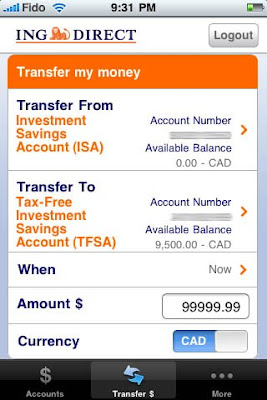
There was one glitch where if I tried initiating a transaction with the "Later" date option using its built-in calendar, but instead chose today's date, it claimed today was a weekend day and would not let me proceed. However, choosing the option for a transaction "Now" worked fine. It looks like a quick update is in order to fix this bug.
There are a few other included options like the savings, GIC, and mortgage rate listings and fairly useless features like the Twitter posts and automated banking machine locator. There are all of 4 bank machine sites in all of Toronto according to the map.

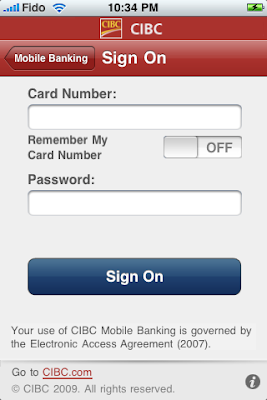
CIBC has already had a banking application for months now too, but I hadn't been able to try it because I wasn't a CIBC client. I've heard good things about it though.
I hope the other big banks go this same direction soon. These apps are too simple and useful not to have. Royal, TD, Scotia, and BMO, where are you? To be fair, some of the others have browser based mobile pages, but it'd still be nice to get dedicated iPhone apps.
It is remarkably effective and easy to use, for accounts that have been previously set up online. Within minutes of installing the application I had already transferred some money from my ING account to a non-ING bank account. In fact, it was even simpler than online banking with some banks through Safari. No browser incompatibilities to worry about.
There was even an option for transferring either Canadian or US currency. I tried the Canadian $ transfer, but not the US $ transfer, as I don't have a US account.
There was one glitch where if I tried initiating a transaction with the "Later" date option using its built-in calendar, but instead chose today's date, it claimed today was a weekend day and would not let me proceed. However, choosing the option for a transaction "Now" worked fine. It looks like a quick update is in order to fix this bug.
There are a few other included options like the savings, GIC, and mortgage rate listings and fairly useless features like the Twitter posts and automated banking machine locator. There are all of 4 bank machine sites in all of Toronto according to the map.
CIBC has already had a banking application for months now too, but I hadn't been able to try it because I wasn't a CIBC client. I've heard good things about it though.
I hope the other big banks go this same direction soon. These apps are too simple and useful not to have. Royal, TD, Scotia, and BMO, where are you? To be fair, some of the others have browser based mobile pages, but it'd still be nice to get dedicated iPhone apps.
Wednesday, February 10, 2010
Aperture 3 out, recommends Core 2 Duo
Apple yesterday released version 3 of Aperture. At first I thought a Core 2 Duo was required. Nope that's dead wrong. Core 2 Duo is recommended, but not required.
Thursday, January 28, 2010


Wednesday, January 27, 2010
iPad: Not interested
So, it turns out it was just a giant iPhone after all.
Well, not quite. It's more like a giant tarted up iPod touch (since you can't call anyone on it) that can have 3G data support (from AT&T, for a bunch of $ every month), if you cough up extra up front for 3G support that is. The maxed out iPad is US$830, although a geek might get by with a 32 GB $730 version. It has no real functional USB port (and the camera adapter doesn't count), it doesn't support Flash (which isn't completely surprising given its Apple-owned PA Semi SoC heritage, plus the fact that Apple despises Flash), and it doesn't even have a front-facing camera (or any other camera for that matter).
On the plus side, it can run iWork. I like Keynote and use it all the time, because I create Keynote presentations myself for own use on my own Macs when I need to present them, so the iPad would work there. However, as any enterprise employee will tell you, iWork's Pages just doesn't cut it for a world based on Word. At least the iPad's external keyboard support is nice.
Up until the launch, I just couldn't figure out what amazing features and/or content Apple could have added to the iPad to make it stand out in the established iPhone & laptop (or even netbook) world. It looks like Apple hasn't quite figured it out yet either. Maybe more will come with time, but so far I'm just not that interested.
If anything, I'm more interested in what the iPad experiment will mean for my current and future iPhones. I'd like to see iPhone computing and media capabilities expand sooner rather than later, and external keyboard support would be very nice too.
Well, not quite. It's more like a giant tarted up iPod touch (since you can't call anyone on it) that can have 3G data support (from AT&T, for a bunch of $ every month), if you cough up extra up front for 3G support that is. The maxed out iPad is US$830, although a geek might get by with a 32 GB $730 version. It has no real functional USB port (and the camera adapter doesn't count), it doesn't support Flash (which isn't completely surprising given its Apple-owned PA Semi SoC heritage, plus the fact that Apple despises Flash), and it doesn't even have a front-facing camera (or any other camera for that matter).
On the plus side, it can run iWork. I like Keynote and use it all the time, because I create Keynote presentations myself for own use on my own Macs when I need to present them, so the iPad would work there. However, as any enterprise employee will tell you, iWork's Pages just doesn't cut it for a world based on Word. At least the iPad's external keyboard support is nice.
Up until the launch, I just couldn't figure out what amazing features and/or content Apple could have added to the iPad to make it stand out in the established iPhone & laptop (or even netbook) world. It looks like Apple hasn't quite figured it out yet either. Maybe more will come with time, but so far I'm just not that interested.
If anything, I'm more interested in what the iPad experiment will mean for my current and future iPhones. I'd like to see iPhone computing and media capabilities expand sooner rather than later, and external keyboard support would be very nice too.
Subscribe to:
Posts (Atom)