Thursday, September 28, 2006

Video card too big for Cube? Use a hacksaw!

When I bought my Apple Power Mac Cube two years ago, the first thing I noticed was how poorly some OS X GUI features like Exposé looked with the stock ATI Rage 128 Pro, a video card that doesn't support Quartz Extreme. One my first upgrade goals was to install a new Quartz Extreme compatible card, and that card was the GeForce 2 MX. First I looked around eBay and found a cheap PC GeForce 2 MX that had been flashed to work on Macs. I bought it hoping it would fit in the Cube, but it didn't. It was just a tad too tall so that it was blocked by the Cube's VRM module. I didn't feel like moving the VRM module, so instead I just ordered an Apple OEM GeForce 2 MX that had been pulled from an old Cube. It was simple to install and worked well for me for 1.5 years.

Unfortunately, that GeForce 2 MX has not been doing very well lately, so I re-installed the old Rage 128 card. The first thing I noticed this time around (besides the stuttery Exposé) was that the Cube didn't seem to work correctly with some QuickTime trailers. With the ATI card, 2.5 Mbps 480p H.264 would stutter, with an average frame rate of about 16-20 fps. Re-installing the GeForce 2 MX card proved that the GPU was important for viewing these videos, because all was smooth again with the GeForce card. (I'm not sure why it helps, but I suspect it has to do with Quartz Extreme, as the GPU doesn't do any H.264 decode assist. The GeForce 2 MX does have 32 MB video RAM, which is twice that of the ATI card, but I'm not sure that is significant here.)

However, as I said, my GeForce 2 MX card was failing. Remembering I had another GeForce 2 MX card in my closet, I decided to do something drastic instead of suffering through using OS X without Quartz Extreme again. And yes, this involved my trusty Mastercraft hacksaw from Canadian Tire.
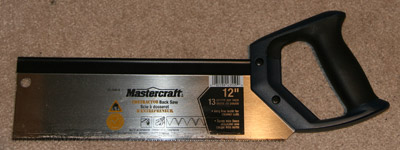

To make the card fit, I needed to shave several millimetres off the height of the card, so that's what I did. Below is the front view of the card, with the cut made just above an unused connector.
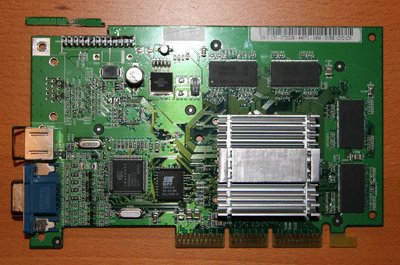
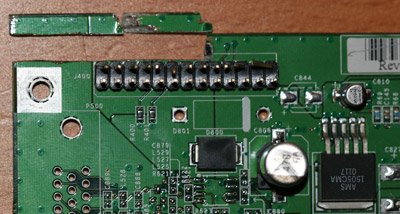

Unfortunately, to do that I actually had to cut several of the board's traces. These are visible on the back of the board, in the picture below. (Click to enlarge.)
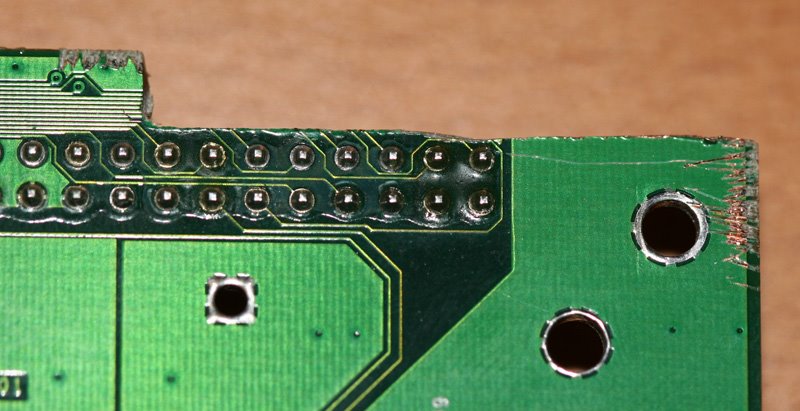

I took the chance of doing this since that connector was unused, and all the traces in that region seemed to be important only for that connector.

With that piece cut out, the video card fits into the Cube quite nicely. You'll see that it easily clears a large component at the top of the VRM board.
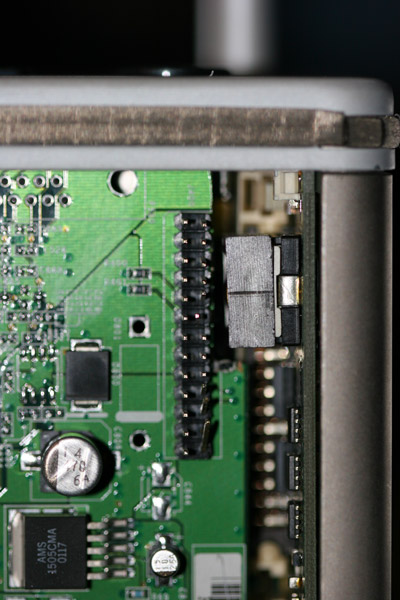

Actually, the video card touches another component of the VRM board lower down, but there isn't much stress on that board so (for now) I didn't bother cutting another piece out of the video card down lower to match.

The video card won't work with the stock bracket, but fits fine without it.
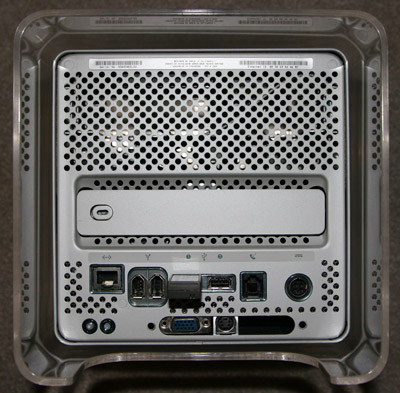

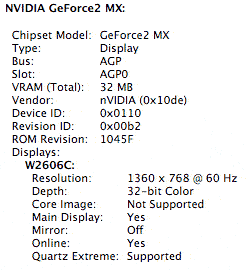
I am happy to report it all works great. The video card gets fairly hot, but that is par for the course with these fanless GeForce 2 MX cards, which is probably why my prevous one has begun to fail. However, with my newly hacked card, there is no instability whatsoever, and no sleep issues either.
Wednesday, September 27, 2006

iTunes 7.0.1 is out

Apple has now released the iTunes 7.0.1 update in Software Update:
iTunes 7.0.1 addresses stability and performance issues with Cover Flow, CD importing, iPod syncing, and more.
Hopefully this will address the many issues people have been having with iTunes 7. Just in time too, since I received my 30 GB video iPod today, to replace my sad iPod mini.

Monday, September 25, 2006

Aperture 1.5 allows custom image libraries

Apple has announced the imminent release of version 1.5 of it popular Aperture photo managment and editing application.

This is a big release, one that addresses most of the issues people have had with previous releases, and one that adds a whole new set of features as well. Significantly, Aperture 1.5 has removed the requirement to use its central proprietary image library, and has added features such as drag and drop JPEG export, etc. Furthermore, the MacBook, Mac mini, and GeForce FX 5200 Ultra are all now officially supported. Added support for the GeForce FX 5200 Ultra means that some early G5 iMacs (with 1.8 GHz G5s) and all G5 Power Macs (with sufficient RAM) now can run this application, whereas previously they couldn't. (Both the Mac mini and MacBook ran Aperture already, but they were not officially supported previously.)

Missing, however, are key features like lens correction filters. I suspect we'll see them next year in Aperture 2.0. I also miss the "panties" that were removed in Aperture 1.0.1. ;)

Creative Pro has published an extensive preview of Aperture 1.5 here.

Saturday, September 23, 2006

Sad, sad iPod mini

This little trooper has worked tirelessly for me for the last 1.5 years, but alas, my 6 GB iPod mini took one too many falls. (Yes, he's hit the ground more than once.)

I couldn't help but like Apple's sad iPod icon though:


However, not all their icons tug at the heart as much:


As far as I can tell, the drive is the culprit. I tried substituting in a CompactFlash card, but as expected it didn't work.


Apparently, the Apple MicroDrives have a custom firmware so that Apple MicroDrives won't work in third party devices, and third party drives/flash cards generally won't work in iPods. It's too bad the flash cards don't work, because it wiould be great to have a completely solid state mini. I could buy a replacement Seagate or IBM MicroDrive (even up to 8 GB), but it looks like it's time to upgrade.

Now, what to buy... I would have bought a new widescreen iPod, but they don't exist. The 8 GB nano is a great little unit, but unfortunately, it only comes in black. The shuffle is a nice convenient little item given its size and built-in clip. However, I think I'll use my Sony Ericsson K790a phone for now, while I contemplate my options. Where is that Apple iPhone when you need it?

Thursday, September 21, 2006

Parallels 1898 eliminates 64-bit Mac kernel panics

Parallels Desktop for Mac is an interesting program that allows one to run a Windows virtual machine from within Mac OS X on Intel Macs. Unlike Boot Camp, there is no need to shut down Mac OS X and reboot into Windows.

I had tested it out on my MacBook, and it worked just fine. It's not as fast running Windows natively under Boot Camp, but because it's not running under emulation, it's much faster than running Virtual PC on PowerPC Macs. In fact, Parallels is almost fast enough to playback 720p HD H.264 video files on an Intel iMac. This is a huge performance increase over Virtual PC. Although Virtual PC is a remarkable program, speed is not one of its fortes.

Unfortunately, on my 24" iMac with 7600 GT, starting a Parallels virtual machine with the latest release version of Parallels immediately causes OS X to kernel panic. Fortunately, there is a release candidate 1898 build which solves the problem for 64-bit Intel Macs, including the new Core 2 Duo iMacs. However, it (reversibly) limits memory usage of the machine to 2 GB. That for now is not a significant issue for me, as I only have 2 GB anyway, but it is a major limitation for Mac Pro users who have more than 2 GB RAM. There is light at the end of the tunnel for Mac Pro users though. Build 1908 is an internal build that solves the memory problem. It may not be completely stable for some people however.

Another glitch on my 24" iMac is that networking in Parallels through wired Ethernet does not work in Windows XP. Fortunately, wireless works, so I can use that for software updates, etc. This is very important on Windows XP for keeping my virus checker up to date of course.


[Update 2006-09-22]

It seems that the 2 GB limitation of Parallels 1898 isn't really 2 GB. It's slightly less than that:


I suppose I can live with the 0.05 GB loss for now. ;)


[Update 2006-09-25]

I installed build 1910 yesterday, which removes the 2 GB memory limitation. I haven't tested it extensively, but it seems to work fine on my Core 2 Duo iMac.

Apple underclocking 7600 GT in 24 inch iMac?

According to this MacRumors forum post, the 7600 GT in the 24" iMac runs at only 500 MHz core and 575 MHz memory. There could be a couple of reasons for this:

1) Apple cheaped out and is using cheaper components
2) Apple felt the heat generated from the GPU at higher clocks could compromise the iMac's reliability.
3) Apple felt the heat generated from the GPU at higher clocks would cause the fan to come on too often and make the iMac louder.

Whatever the reason, at least under Windows XP, one can clock it back to usual PC 7600 GT speeds. Whether that is safe or not is unknown at this time. It would be nice if someone could write such a utility for Mac OS X, to compare performance benchmarks with say Cinebench, Aperture, and 3D games.