

Wednesday, March 24, 2010

ING Canada releases iPhone banking app

ING Canada today released its banking application for the iPhone.


It is remarkably effective and easy to use, for accounts that have been previously set up online. Within minutes of installing the application I had already transferred some money from my ING account to a non-ING bank account. In fact, it was even simpler than online banking with some banks through Safari. No browser incompatibilities to worry about.

There was even an option for transferring either Canadian or US currency. I tried the Canadian $ transfer, but not the US $ transfer, as I don't have a US account.
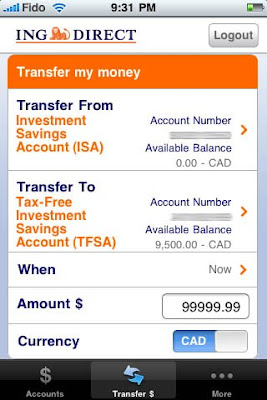


There was one glitch where if I tried initiating a transaction with the "Later" date option using its built-in calendar, but instead chose today's date, it claimed today was a weekend day and would not let me proceed. However, choosing the option for a transaction "Now" worked fine. It looks like a quick update is in order to fix this bug.

There are a few other included options like the savings, GIC, and mortgage rate listings and fairly useless features like the Twitter posts and automated banking machine locator. There are all of 4 bank machine sites in all of Toronto according to the map.



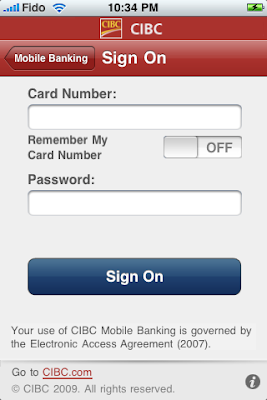
CIBC has already had a banking application for months now too, but I hadn't been able to try it because I wasn't a CIBC client. I've heard good things about it though.


I hope the other big banks go this same direction soon. These apps are too simple and useful not to have. Royal, TD, Scotia, and BMO, where are you? To be fair, some of the others have browser based mobile pages, but it'd still be nice to get dedicated iPhone apps.

Wednesday, February 10, 2010

Aperture 3 out, recommends Core 2 Duo

Apple yesterday released version 3 of Aperture. At first I thought a Core 2 Duo was required. Nope that's dead wrong. Core 2 Duo is recommended, but not required.


Thursday, January 28, 2010

Wednesday, January 27, 2010

iPad: Not interested

So, it turns out it was just a giant iPhone after all.

Well, not quite. It's more like a giant tarted up iPod touch (since you can't call anyone on it) that can have 3G data support (from AT&T, for a bunch of $ every month), if you cough up extra up front for 3G support that is. The maxed out iPad is US$830, although a geek might get by with a 32 GB $730 version. It has no real functional USB port (and the camera adapter doesn't count), it doesn't support Flash (which isn't completely surprising given its Apple-owned PA Semi SoC heritage, plus the fact that Apple despises Flash), and it doesn't even have a front-facing camera (or any other camera for that matter).

On the plus side, it can run iWork. I like Keynote and use it all the time, because I create Keynote presentations myself for own use on my own Macs when I need to present them, so the iPad would work there. However, as any enterprise employee will tell you, iWork's Pages just doesn't cut it for a world based on Word. At least the iPad's external keyboard support is nice.

Up until the launch, I just couldn't figure out what amazing features and/or content Apple could have added to the iPad to make it stand out in the established iPhone & laptop (or even netbook) world. It looks like Apple hasn't quite figured it out yet either. Maybe more will come with time, but so far I'm just not that interested.

If anything, I'm more interested in what the iPad experiment will mean for my current and future iPhones. I'd like to see iPhone computing and media capabilities expand sooner rather than later, and external keyboard support would be very nice too.


Tuesday, January 26, 2010

Impending Mac tablet: What is it?

Impending Mac tablet: What is it? Hell if I know.

Is it just a big iPhone? If so, then it would be too big to be a truly functional iPhone. It has to be more than that.

Is it just a touchscreen keyboard-less laptop? If so, then it would be a pretty limited laptop. It has to be more than that.

Is it just an in-between machine? If so, it could do neither well, requiring an iTablet owner to own all three. It has to be more than that.

I think one thing we should do, however, is to stop focusing on the hardware. What an iSlate really needs to get off the ground is proper media connectivity and content, all accessed through an intuitive OS. The hard part is getting all the publishing and media companies on board, along with a sleek content delivery system, but Jobs probably has a lot of that wrapped up into a nice easy to use iTunes package already. How encompassing will that "a lot" be, and will it be enough? We shall see tomorrow... and in the months and years following. The iPad could end up being as important as the iPhone, or it could end up being as irrelevant as AppleTV.

The other part of all of this I personally wonder about is whether or not all that media goodness will be available to us multitouch MacBook and MacBook Pro owners. I'm not really holding out a lot of hope there, but maybe Apple will surprise us there too.


Thursday, December 24, 2009

I have no 27" iMac i7 screen issues

Gen asked what 27" iMac screen issues I've had, and I'm happy to say I have never had any.

However, for those of you who have experienced 27" iMac video flickering, Apple has released the 27-inch iMac Graphics Firmware Update 1.0:

About 27-inch iMac Graphics Firmware Update 1.0

Updates the graphics firmware on ATI Radeon HD 4670 and 4850 graphics cards to address issues that may cause image corruption or display flickering.

The iMac Graphics Firmware Update will update the graphics firmware on your iMac.

Do not disturb or shut off the power on your iMac during this update. Loss of power could result in your iMac failing to start up.

For detailed information on this update, please visit this website: http://support.apple.com/kb/TS3181