I have finally had the chance to test DVD+R, DVD-R, dual-layer DVD+R, and dual-layer DVD-R in my Cube's original Matsushita SR-8186 DVD-ROM drive. This drive is using the Y213 firmware, which is a custom region free firmware, but otherwise it is the same as the usual SR-8186 firmware. Here are my results:
DVD-R: Works
DVD-R DL: Does not work*
DVD+R: Does not work
DVD+R bitset: Works
DVD+R DL: Does not work
DVD+R DL bitset: Works
* I have not tested many dual-layer DVD-R discs. So far I have tested only one brand, but it is readable in my other machines, including my 5 year-old Panasonic RP91 DVD player.
The reason the above information may be important is the issue of +R and dual-layer recordable DVD media. Most drives work with single-layer DVD-R natively, but many older drives won't work with single-layer DVD+R or dual-layer DVD media of any kind, when the media's book type is properly set. However, one can get both single and dual-layer DVD+R discs to work on these drives simply by changing their book type.
How does one set the +R book type to DVD-ROM? Unfortunately, only specific burners support this feature. Most will only set +R discs as +R, because that is what they are supposed to do. However, some will allow the user to choose which setting to use, and a few drives just default to the DVD-ROM setting for maximum compatibility. Since my iMac's and MacBook's Pioneer burners don't support bitsetting, I keep an external Firewire bitsetting drive around. It is a Pioneer DVR-110D flashed with a Buffalo bitsetting firmware.
If you need some further information on the various DVD formats, please check out my DVD recordable FAQ. I have not updated it in three years so it completely ignores dual-layer recordable media, but some of it still may be of help to some of you as a basic DVD primer. For more in-depth and up-to-date information, you should also check out Jim Taylor's DVD FAQ.
Thursday, October 05, 2006
Friday, September 29, 2006
iPod Software 1.2 doubles battery life
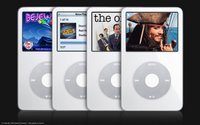 Apple's recently released iPods have a claimed battery life of 3.5 hours for the 30 GB iPod and 6.5 hours for the 80 GB iPod. That's about double the claimed 2 and 3 hour battery life of the previous 30 GB and 60 GB models respectively.
It seems that much (if not all) of that battery life difference is due to software. The latest 1.2 iPod Software adds the new screen brightness adjustment feature to last year's iPod models, which in turn has markedly increased the battery life of these models as well.
I recently purchased a refurbished 30 GB 5G iPod (which is last year's model) to replace my dead iPod mini and have done some testing. With the screen brightness set about halfway to the left (about at the one quarter setting) and audio set at the mid setting, I got 3.5 hours usage out of it, which just so happens is exactly how long the new version is claimed to last. My iPod shut off after precisely 210 minutes of TV show viewing, just a little bit before the end of the fifth 43 minute episode. (These episodes were encoded using QuickTime 7.1.3 with 1.6 Mbps Baseline Low Complexity H.264, at 608x336 or 624x352. The files were just over 500 MB each.) The one quarter setting is perfect for a moderately dark environment, such as on a plane when the overhead lights are off.
I'm sure I could get the iPod to last around 4 hours if I reduced the screen to its lowest brightness setting. In fact there has been a report of an 5G iPod reaching almost 8 hours of playback with 320x240 H.264 video, after the 1.2 iPod update. The same iPod would only last about two hours previously, just as advertised, since the screen was always stuck at full brightness.
By the way, TV playback output is surprisingly good, if the source video is good. Despite the drawbacks of 1.6 Mbps Baseline Low Complexity H.264, it is still a dramatic improvement over the previous 320x240 video on a TV. One side note is that while the iPod uses a non-standard cable for the TV out, any comparable AV cable will do. One just needs to remember that the video signal from a standard AV cable will be on the red output, not the usual yellow output.
Better gaming with games from the iTunes Store is also a new feature in the iPod 1.2 Software. I purchased Pac Man, and besides a few upgrades to the menu features and screen layout, the game is essentially identical to the arcade version. However, controlling the game with the click wheel is a bit tough to get used to.
This latest iPod refresh has proven to be an excellent one, not just for those buying now, but also for those with the previous 5G iPods.
Thursday, September 28, 2006
Video card too big for Cube? Use a hacksaw!
When I bought my Apple Power Mac Cube two years ago, the first thing I noticed was how poorly some OS X GUI features like Exposé looked with the stock ATI Rage 128 Pro, a video card that doesn't support Quartz Extreme. One my first upgrade goals was to install a new Quartz Extreme compatible card, and that card was the GeForce 2 MX. First I looked around eBay and found a cheap PC GeForce 2 MX that had been flashed to work on Macs. I bought it hoping it would fit in the Cube, but it didn't. It was just a tad too tall so that it was blocked by the Cube's VRM module. I didn't feel like moving the VRM module, so instead I just ordered an Apple OEM GeForce 2 MX that had been pulled from an old Cube. It was simple to install and worked well for me for 1.5 years.
Unfortunately, that GeForce 2 MX has not been doing very well lately, so I re-installed the old Rage 128 card. The first thing I noticed this time around (besides the stuttery Exposé) was that the Cube didn't seem to work correctly with some QuickTime trailers. With the ATI card, 2.5 Mbps 480p H.264 would stutter, with an average frame rate of about 16-20 fps. Re-installing the GeForce 2 MX card proved that the GPU was important for viewing these videos, because all was smooth again with the GeForce card. (I'm not sure why it helps, but I suspect it has to do with Quartz Extreme, as the GPU doesn't do any H.264 decode assist. The GeForce 2 MX does have 32 MB video RAM, which is twice that of the ATI card, but I'm not sure that is significant here.)
However, as I said, my GeForce 2 MX card was failing. Remembering I had another GeForce 2 MX card in my closet, I decided to do something drastic instead of suffering through using OS X without Quartz Extreme again. And yes, this involved my trusty Mastercraft hacksaw from Canadian Tire.
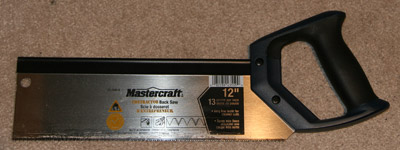
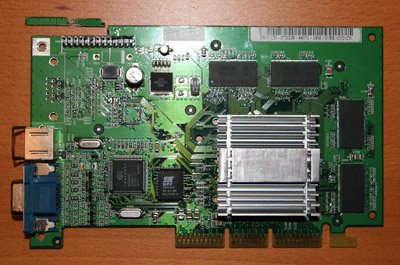
To make the card fit, I needed to shave several millimetres off the height of the card, so that's what I did. Below is the front view of the card, with the cut made just above an unused connector.
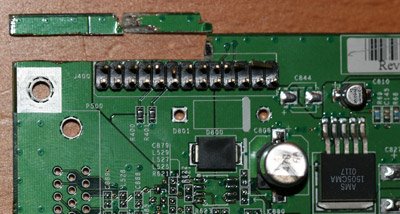
Unfortunately, to do that I actually had to cut several of the board's traces. These are visible on the back of the board, in the picture below. (Click to enlarge.)
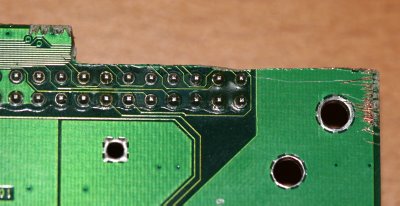
I took the chance of doing this since that connector was unused, and all the traces in that region seemed to be important only for that connector.
With that piece cut out, the video card fits into the Cube quite nicely. You'll see that it easily clears a large component at the top of the VRM board.
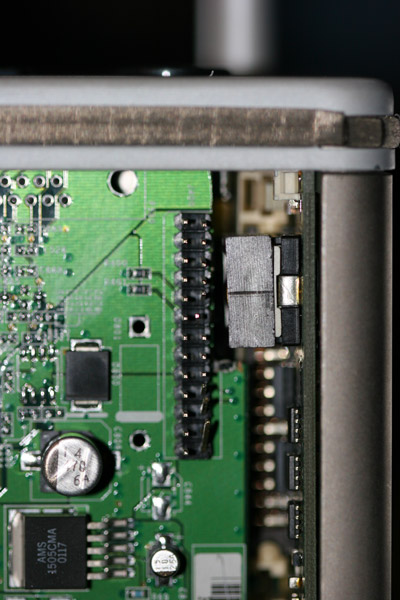
Actually, the video card touches another component of the VRM board lower down, but there isn't much stress on that board so (for now) I didn't bother cutting another piece out of the video card down lower to match.
The video card won't work with the stock bracket, but fits fine without it.
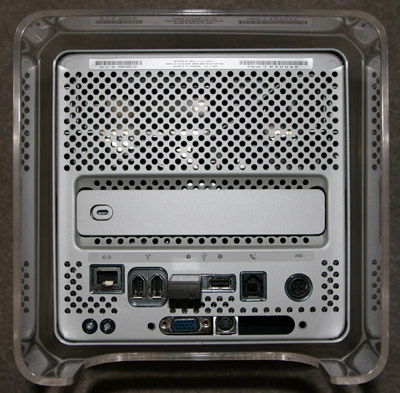
I am happy to report it all works great. The video card gets fairly hot, but that is par for the course with these fanless GeForce 2 MX cards, which is probably why my prevous one has begun to fail. However, with my newly hacked card, there is no instability whatsoever, and no sleep issues either.
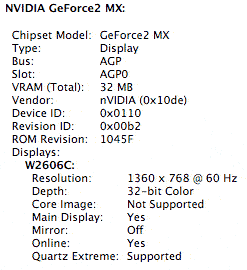
Unfortunately, that GeForce 2 MX has not been doing very well lately, so I re-installed the old Rage 128 card. The first thing I noticed this time around (besides the stuttery Exposé) was that the Cube didn't seem to work correctly with some QuickTime trailers. With the ATI card, 2.5 Mbps 480p H.264 would stutter, with an average frame rate of about 16-20 fps. Re-installing the GeForce 2 MX card proved that the GPU was important for viewing these videos, because all was smooth again with the GeForce card. (I'm not sure why it helps, but I suspect it has to do with Quartz Extreme, as the GPU doesn't do any H.264 decode assist. The GeForce 2 MX does have 32 MB video RAM, which is twice that of the ATI card, but I'm not sure that is significant here.)
However, as I said, my GeForce 2 MX card was failing. Remembering I had another GeForce 2 MX card in my closet, I decided to do something drastic instead of suffering through using OS X without Quartz Extreme again. And yes, this involved my trusty Mastercraft hacksaw from Canadian Tire.
To make the card fit, I needed to shave several millimetres off the height of the card, so that's what I did. Below is the front view of the card, with the cut made just above an unused connector.
Unfortunately, to do that I actually had to cut several of the board's traces. These are visible on the back of the board, in the picture below. (Click to enlarge.)
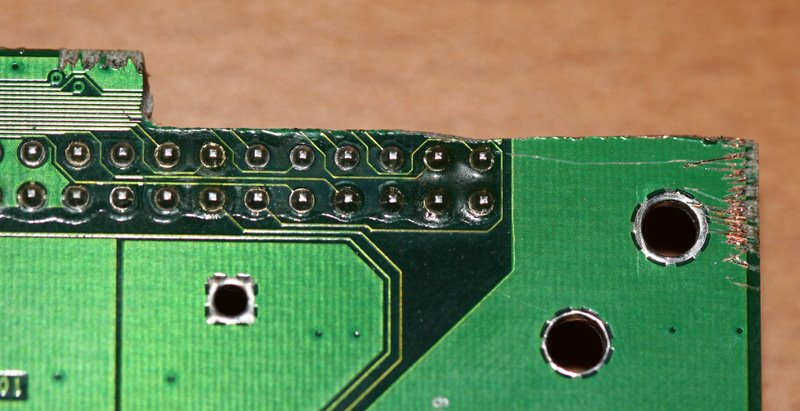
I took the chance of doing this since that connector was unused, and all the traces in that region seemed to be important only for that connector.
With that piece cut out, the video card fits into the Cube quite nicely. You'll see that it easily clears a large component at the top of the VRM board.
Actually, the video card touches another component of the VRM board lower down, but there isn't much stress on that board so (for now) I didn't bother cutting another piece out of the video card down lower to match.
The video card won't work with the stock bracket, but fits fine without it.
I am happy to report it all works great. The video card gets fairly hot, but that is par for the course with these fanless GeForce 2 MX cards, which is probably why my prevous one has begun to fail. However, with my newly hacked card, there is no instability whatsoever, and no sleep issues either.
Wednesday, September 27, 2006
iTunes 7.0.1 is out
Apple has now released the iTunes 7.0.1 update in Software Update:
iTunes 7.0.1 addresses stability and performance issues with Cover Flow, CD importing, iPod syncing, and more.Hopefully this will address the many issues people have been having with iTunes 7. Just in time too, since I received my 30 GB video iPod today, to replace my sad iPod mini.
Monday, September 25, 2006
Aperture 1.5 allows custom image libraries
Apple has announced the imminent release of version 1.5 of it popular Aperture photo managment and editing application.
This is a big release, one that addresses most of the issues people have had with previous releases, and one that adds a whole new set of features as well. Significantly, Aperture 1.5 has removed the requirement to use its central proprietary image library, and has added features such as drag and drop JPEG export, etc. Furthermore, the MacBook, Mac mini, and GeForce FX 5200 Ultra are all now officially supported. Added support for the GeForce FX 5200 Ultra means that some early G5 iMacs (with 1.8 GHz G5s) and all G5 Power Macs (with sufficient RAM) now can run this application, whereas previously they couldn't. (Both the Mac mini and MacBook ran Aperture already, but they were not officially supported previously.)
Missing, however, are key features like lens correction filters. I suspect we'll see them next year in Aperture 2.0. I also miss the "panties" that were removed in Aperture 1.0.1. ;)
Creative Pro has published an extensive preview of Aperture 1.5 here.
This is a big release, one that addresses most of the issues people have had with previous releases, and one that adds a whole new set of features as well. Significantly, Aperture 1.5 has removed the requirement to use its central proprietary image library, and has added features such as drag and drop JPEG export, etc. Furthermore, the MacBook, Mac mini, and GeForce FX 5200 Ultra are all now officially supported. Added support for the GeForce FX 5200 Ultra means that some early G5 iMacs (with 1.8 GHz G5s) and all G5 Power Macs (with sufficient RAM) now can run this application, whereas previously they couldn't. (Both the Mac mini and MacBook ran Aperture already, but they were not officially supported previously.)
Missing, however, are key features like lens correction filters. I suspect we'll see them next year in Aperture 2.0. I also miss the "panties" that were removed in Aperture 1.0.1. ;)
Creative Pro has published an extensive preview of Aperture 1.5 here.
Saturday, September 23, 2006
Sad, sad iPod mini
This little trooper has worked tirelessly for me for the last 1.5 years, but alas, my 6 GB iPod mini took one too many falls. (Yes, he's hit the ground more than once.)
I couldn't help but like Apple's sad iPod icon though:

However, not all their icons tug at the heart as much:

As far as I can tell, the drive is the culprit. I tried substituting in a CompactFlash card, but as expected it didn't work.

Apparently, the Apple MicroDrives have a custom firmware so that Apple MicroDrives won't work in third party devices, and third party drives/flash cards generally won't work in iPods. It's too bad the flash cards don't work, because it wiould be great to have a completely solid state mini. I could buy a replacement Seagate or IBM MicroDrive (even up to 8 GB), but it looks like it's time to upgrade.
Now, what to buy... I would have bought a new widescreen iPod, but they don't exist. The 8 GB nano is a great little unit, but unfortunately, it only comes in black. The shuffle is a nice convenient little item given its size and built-in clip. However, I think I'll use my Sony Ericsson K790a phone for now, while I contemplate my options. Where is that Apple iPhone when you need it?
I couldn't help but like Apple's sad iPod icon though:

However, not all their icons tug at the heart as much:

As far as I can tell, the drive is the culprit. I tried substituting in a CompactFlash card, but as expected it didn't work.

Apparently, the Apple MicroDrives have a custom firmware so that Apple MicroDrives won't work in third party devices, and third party drives/flash cards generally won't work in iPods. It's too bad the flash cards don't work, because it wiould be great to have a completely solid state mini. I could buy a replacement Seagate or IBM MicroDrive (even up to 8 GB), but it looks like it's time to upgrade.
Now, what to buy... I would have bought a new widescreen iPod, but they don't exist. The 8 GB nano is a great little unit, but unfortunately, it only comes in black. The shuffle is a nice convenient little item given its size and built-in clip. However, I think I'll use my Sony Ericsson K790a phone for now, while I contemplate my options. Where is that Apple iPhone when you need it?
Subscribe to:
Posts (Atom)