Saturday, October 10, 2009

Intel L3426 = Quad-core Xeon iMac?

Intel released a curious new CPU a few weeks ago. It's a Xeon, a chip class usually reserved for high-powered workstations (including the Mac Pro) and servers, yet this chip is quite different than the usual Xeons. Dubbed L3426, it is a relatively inexpensive 64-bit low-clocked (1.86 GHz) quad-core Lynnfield CPU, with a TDP of only 45 Watts, which makes it very interesting for consumer Mac fans.

The reasonably low TDP makes a quad-core Xeon iMac a distinct possibility for the next iMac release. This would seem to support previous Xeon iMac rumours. While 1.86 GHz seems slow, this chip class is actually very, very fast on a per-clock basis, and furthermore, it can rev the clock speed up to 3.2 GHz using Intel's Turbo Boost technology when its multiple cores are not being efficiently utilized. In addition, the Xeon L3426 supports Hyper-Threading, like all the Xeon 3000 series processors. This further differentiates it from Intel's consumer class Core i5 CPUs, which do not support HT.

Alternatively, if Apple wants to put quad-core into the iMac, it can use Intel's Clarksfield Core i7 Mobile class of processors. These chips have the same 45 Watt TDP and are quite similar to Xeon L3426, but are somewhat slower clocked, yet still remain very, very fast. In fact, it is possible that Apple will use Core i7 for low-end (1.60/2.80 GHz) and mid-end (1.73/3.06 GHz) iMacs, and Xeon L3426 for the top-of-the-line (1.86/3.20 GHz) iMac model, although ironically the reported Xeon L3426 pricing is cheaper than the Core i7 Mobile chips. Whether or not it is truly cheaper, the take home message is that Xeon L3426 isn't prohibitively expensive for consumer Macs.

There is also Core i7 Mobile Extreme which is faster clocked than Xeon L3426, but that chip has a higher TDP, which makes it less attractive for use in near-silent all-in-one iMacs.

Wednesday, October 07, 2009

Telus and Bell Canada to get the iPhone

In just a few short weeks, the two Canadian CDMA providers Bell and Telus will get the iPhone. How is this possible? Well, it turns out the two companies have been building an HSPA network together to access all the cool phones and to get in on that lucrative foreign roaming action.

BTW, at one point Telus try to buy out Fido's GSM network, but then Rogers outbid them and incorporated Fido into Rogers, thereby creating a GSM monopoly in Canada. It was disappointing to say the least. It's about time we get some 3GSM competition around here.

Thursday, September 24, 2009

Video head to head: iPod nano vs Canon 5D II

This is a ridiculous comparison of course, but nonetheless it's worth a glance just for fun. Here is the new video-enabled iPod nano vs. the well-respected Canon EOS 5D Mark II digital SLR.

No ISO 6400 or rack focus rig on the iPod nano unfortunately. ;) By the way, with the EF 35 f/1.4L lens and Compact Flash card, the 5D Mark II goes for the bargain basement price of about US$4200.


Sunday, September 20, 2009

HDTV resolutions well supported in Snow Leopard

It took Apple long enough, but HD TV resolutions are finally well supported in Mac OS X. Here is a screengrab of my 13" MacBook Pro supplying 1920x1080i to my Panasonic PT-AX200U home theatre projector, in 10.6 Leopard.


Saturday, August 29, 2009

Safari 4 in Snow Leopard is very, very fast

Just how fast is Snow Leopard? It's hard to say since every application will perform differently. However, one application that just about everyone uses these days is a web browser, and on the Mac, Safari is the most popular.

After browsing around the net a while with Safari in Snow Leopard, it definitely feels faster. But how much faster is it really? Let's put that to the test.

Hardware: 13" MacBook Pro, 2 GB 1067 MHz DDR3, 2.26 GHz Core 2 Duo
Software: SunSpider JavaScript Benchmark 0.9

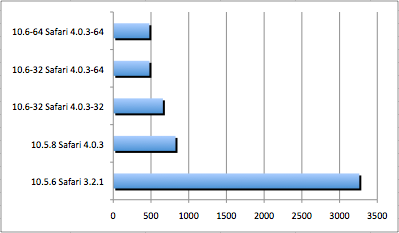
Mac OS X 10.5.6, Safari 3.2.1: 3261.8 ms
Mac OS X 10.5.8, Safari 4.0.3 (5531.9): 824.8 ms
Mac OS X 10.6 32-bit, 32-bit Safari 4.0.3 (6531.9): 657.6 ms
Mac OS X 10.6 32-bit, 64-bit Safari 4.0.3 (6531.9): 479.2 ms
Mac OS X 10.6 64-bit, 64-bit Safari 4.0.3 (6531.9): 478.4 ms

(Lower is better)


As you can see, Snow Leopard's Safari 4.0.3 is noticeably faster as a 64-bit application than a 32-bit application. Still, even the 32-bit version of Safari 4 in Snow Leopard 10.6 is significantly faster than Safari 4 in Leopard 10.5.8. Of note, the speed of the 64-bit Safari 4 was essentially identical regardless if Snow Leopard 10.6 was running in 32-bit or 64-bit mode.

The older Safari 3.2.1 wasn't even in the same league, and our results mirror our previous benchmarks from back at the beginning of the year when the Safari 4 beta was released.

I personally will be sticking with the default 64-bit Safari, but those of you using third-party Safari plugins might benefit from the 32-bit version, since most of these plugins are currently incompatible with the 64-bit Safari.

P.S. Some of the more astute geeks might be wondering how I got 10.5.6 Leopard and Safari 3.2.1 running on a 13" MacBook Pro, considering the machine shipped with 10.5.7 and I believe Safari 3.2.3. Actually, I had a previous install of 10.5.6 on an external hard drive, as a backup for my white 13" MacBook. I hooked that drive up to the 13" MacBook Pro, and it actually booted, albeit initially with a few errors, and Safari 3.2.1 worked fine with the machine.

13" Mac laptop and 64-bit Snow Leopard: It works!

13" Mac laptop and 64-bit Snow Leopard: It works! Well, sorta. I can confirm it works on the latest 13" MacBook Pro at least.

Whether your Mac's CPU is 64-bit or not, Mac OS X 10.6 Snow Leopard's 64-bit kernel is normally only able to load if the machine also has a 64-bit EFI. You can tell if your machine has a 32-bit or 64-bit EFI by typing this command in Terminal:

ioreg -l -p IODeviceTree | grep firmware-abi

However, according to OSnews, the OS X seed notes claim that the 64-bit kernel of Snow Leopard is not supported on any 13" Mac laptop, even if it has a 64-bit EFI. Despite this, 64-bit Snow Leopard loads on my 13" MacBook Pro (aka MacBookPro5,5) just fine.


The latest 13" Mac lives up to its "Pro" name after all.

Despite having this 64-bit capability, I will usually run in 32-bit mode since 32-bit kernel extensions (like printer drivers, etc.) won't run when the 64-bit OS X kernel is loaded, and 64-bit applications can still run normally with the 32-bit OS X kernel.