Reports online state that apps that are compiled specifically for 64-bit G5 systems will no longer run after the latest Security Update 2005-007 in installed. Affected programs include many command line applications as well as the 64-bit version of Mathematica 5.2.
That something as obvious as this could be missed suggests that Apple really needs to revamp their software quality assurance program.
[Update 2005-08-18]
Apple has released Security Update 2005-007 Version 1.1 to correct the problem:
Security Update 2005-007 delivers a number of security enhancements and is recommended for all Macintosh users.
Security Update 2005-007 v1.1 replaces Security Update 2005-007 v1.0 for Tiger systems Mac OS X v10.4.2. Users who have already installed v1.0 on Tiger systems should install v1.1.
Security Update 2005-007 v1.1 provides a combined 32- and 64-bit version of LibSystem to replace the 32-bit version that was delivered in v1.0. No other changes have been made in version 1.1.
Wednesday, August 17, 2005
Monday, August 08, 2005
Core Image, Monitor Spanning, and the new iBook's Radeon 9550
Some of you asked about Core Image after we posted our previous article on the new iBooks released in July which sport the Radeon 9550. As we mentioned in our article updates, yes indeed it does fully support Core Image in hardware, and this is best demonstrated by the ability of the iBook to display the ripple effect in Dashboard:
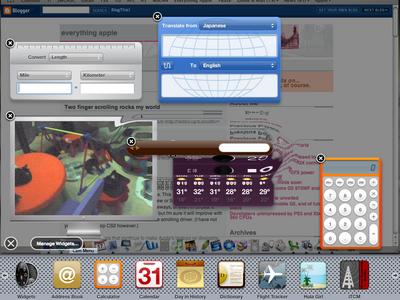
(Click on picture for larger version.)
Update [2005-08-09]
The desktop spanning hack also works fine on the new iBooks. With Screen Spanning Doctor 0.3.3 I can extend my iBook's desktop onto an external 17" 1280x1024 LCD without any problems. I have not tried clamshell mode however, since I do not use this feature.

(Click on picture for larger version.)
Update [2005-08-09]
The desktop spanning hack also works fine on the new iBooks. With Screen Spanning Doctor 0.3.3 I can extend my iBook's desktop onto an external 17" 1280x1024 LCD without any problems. I have not tried clamshell mode however, since I do not use this feature.
Two finger scrolling rocks my world
Although much of the recent scrolling hoopla is with Apple's new scrolling Mighty Mouse, I'm here to extoll the virtues two finger scrolling available with Apple's trackpads on their laptops.
Originally introduced with the last PowerBooks, Apple's two finger scrolling is now standard across all its laptops, so the last iBooks got it too. I have just purchased a 12" iBook and have come to love Apple's implementation of trackpad scrolling.
I have never liked the limited up/down scrolling on scroll mice, and didn't like the trackpad scrolling hacks with 3rd party apps either. Thus, I thought I wouldn't like trackpad scrolling, but it's a world of difference. Not only is it very smooth, but it also works in all directions. This is especially useful for large photographs, say for example in Preview or Safari. With two finger scrolling, I can scroll up, down, right, left, sideways, or even in circles. Diagonal and circular scrolling do not work quite as smoothly in Photoshop CS, but I'm sure it will improve with subsequent updates to Photoshop and/or the scrolling driver. (I have not yet tried Photoshop CS2 however.)
It's these little features that continue to make Apple's laptops so desirable.
Originally introduced with the last PowerBooks, Apple's two finger scrolling is now standard across all its laptops, so the last iBooks got it too. I have just purchased a 12" iBook and have come to love Apple's implementation of trackpad scrolling.
I have never liked the limited up/down scrolling on scroll mice, and didn't like the trackpad scrolling hacks with 3rd party apps either. Thus, I thought I wouldn't like trackpad scrolling, but it's a world of difference. Not only is it very smooth, but it also works in all directions. This is especially useful for large photographs, say for example in Preview or Safari. With two finger scrolling, I can scroll up, down, right, left, sideways, or even in circles. Diagonal and circular scrolling do not work quite as smoothly in Photoshop CS, but I'm sure it will improve with subsequent updates to Photoshop and/or the scrolling driver. (I have not yet tried Photoshop CS2 however.)
It's these little features that continue to make Apple's laptops so desirable.
Friday, August 05, 2005
G5 970FX 2.0 is 39 Watts max
IBM has published an article titled Thermal Considerations: PPC970FX which states the 2.0 GHz G5 has a maximum power output of 39 Watts (105 C part). This number is significantly lower than the 50 Watts listed for previous non-low power 2.0 GHz 970FX chips. Further details are not provided, but it could represent a specific low power version of the chip, which would be sold in parallel with higher power parts.
The question now is what wattage a low power 1.8 GHz 970FX and a 2.5 GHz 970MP would put out.
The question now is what wattage a low power 1.8 GHz 970FX and a 2.5 GHz 970MP would put out.
Tuesday, July 26, 2005
New iBooks and Mac minis released today
After 40 weeks since the last iBook release, Apple finally updated its iBook line. The release is pretty much in line with previous predictions:
12" screen
1.33 GHz G4 7447A
40 GB HD
512 MB RAM
Core Image GPU (Radeon 9550, better than the predicted GeForce FX 5200U)
We also see built-in Airport Extreme (as before), included Bluetooth 2.0, Sudden Motion Sensor technology to protect the hard drive, and the scrolling trackpad. What we don't see is 64 MB RAM for the GPU. Given the relatively low resolution of the screen, 32 MB is usable, even though 64 MB would have been preferred. We didn't see a widescreen form factor, but that seemed unlikely in the first place. The price is unchanged, at US$999.
The 14" iBook now has a built-in SuperDrive as well, whereas it used to cost $1499 with the SuperDrive. If you don't need the SuperDrive, you can select a combo drive to bring down the current 14" model's price to $1199. Interestingly, the 14" iBook has a 142 MHz bus, which doesn't exist on any other Mac as far as I know.
Overall, the new iBooks look like a very nice buy. I bought the new iBook 12" in fact.
However, the Mac mini updates, although reasonable, are more of a mixed bag. They didn't get a clockspeed upgrade, and they did not get a fully Core Image compliant GPU. In the era of Tiger, I would have hoped that all Macs would support the full Core Image feature set in hardware. More important however is the fact that the Mac mini did not receive an increase to the amount of GPU RAM included. While 32 MB is passable on the iBook (with its built-in 1024x768 screen), it is too little for a 2005 desktop in my opinion. Running Exposé with 32 MB on a 17" screen is not ideal (although acceptable for many), and can be outright painful on a 20" screen.
The 1.42 GHz Mac mini seems like a more reasonable upgrade. Apple has stopped including the modem on those units, but instead have included internal Airport Extreme and Bluetooth, a nice upgrade. Thus, it seems the new bang-for-the-buck Mac mini unit is the $599 1.42 GHz Mac mini. It's still stuck with the 32 MB GPU RAM though.
One wonders if part of the reason the Mac mini did not get a speedbump relates to the power output and cost of the CPU. Freescale's datasheet claims the 1.42 GHz G4 7447A has a maximum power output of 30 Watts. Keeping the CPU at 1.42 GHz keeps costs down, and makes it easier to keep Mac minis from overheating. Mind you, the 12" PowerBook handles the 1.5 GHz G4 just fine, and the 15" PowerBook goes up to a 1.67 GHz G4.
Because the Mac mini's upgrades are not as impressive as they could have been, those looking at the Mac mini really should look hard at the iMac G5 too. It is a very good value, and in my opinion represents the better buy for most customers.
[Update 2005-05-27]
Sergey asked if I'm sure the Radeon 9550 supports Core Image. The answer is yes, I'm sure it has full hardware Core Image support. It seems that Apple's Core Image page just hasn't been updated yet.
By the way, my iBook shipped today. :)
[Update 2005-05-27 Part 2]
Apple's Core Image page has now been updated to include the Radeon 9550.
12" screen
1.33 GHz G4 7447A
40 GB HD
512 MB RAM
Core Image GPU (Radeon 9550, better than the predicted GeForce FX 5200U)
We also see built-in Airport Extreme (as before), included Bluetooth 2.0, Sudden Motion Sensor technology to protect the hard drive, and the scrolling trackpad. What we don't see is 64 MB RAM for the GPU. Given the relatively low resolution of the screen, 32 MB is usable, even though 64 MB would have been preferred. We didn't see a widescreen form factor, but that seemed unlikely in the first place. The price is unchanged, at US$999.
The 14" iBook now has a built-in SuperDrive as well, whereas it used to cost $1499 with the SuperDrive. If you don't need the SuperDrive, you can select a combo drive to bring down the current 14" model's price to $1199. Interestingly, the 14" iBook has a 142 MHz bus, which doesn't exist on any other Mac as far as I know.
Overall, the new iBooks look like a very nice buy. I bought the new iBook 12" in fact.
However, the Mac mini updates, although reasonable, are more of a mixed bag. They didn't get a clockspeed upgrade, and they did not get a fully Core Image compliant GPU. In the era of Tiger, I would have hoped that all Macs would support the full Core Image feature set in hardware. More important however is the fact that the Mac mini did not receive an increase to the amount of GPU RAM included. While 32 MB is passable on the iBook (with its built-in 1024x768 screen), it is too little for a 2005 desktop in my opinion. Running Exposé with 32 MB on a 17" screen is not ideal (although acceptable for many), and can be outright painful on a 20" screen.
The 1.42 GHz Mac mini seems like a more reasonable upgrade. Apple has stopped including the modem on those units, but instead have included internal Airport Extreme and Bluetooth, a nice upgrade. Thus, it seems the new bang-for-the-buck Mac mini unit is the $599 1.42 GHz Mac mini. It's still stuck with the 32 MB GPU RAM though.
One wonders if part of the reason the Mac mini did not get a speedbump relates to the power output and cost of the CPU. Freescale's datasheet claims the 1.42 GHz G4 7447A has a maximum power output of 30 Watts. Keeping the CPU at 1.42 GHz keeps costs down, and makes it easier to keep Mac minis from overheating. Mind you, the 12" PowerBook handles the 1.5 GHz G4 just fine, and the 15" PowerBook goes up to a 1.67 GHz G4.
Because the Mac mini's upgrades are not as impressive as they could have been, those looking at the Mac mini really should look hard at the iMac G5 too. It is a very good value, and in my opinion represents the better buy for most customers.
[Update 2005-05-27]
Sergey asked if I'm sure the Radeon 9550 supports Core Image. The answer is yes, I'm sure it has full hardware Core Image support. It seems that Apple's Core Image page just hasn't been updated yet.
By the way, my iBook shipped today. :)
[Update 2005-05-27 Part 2]
Apple's Core Image page has now been updated to include the Radeon 9550.
Sunday, July 24, 2005
Confidential IBM roadmap: 970GX coming, 970MX proposed
IBM has published a previously confidential PowerPC roadmap from last year which covers things from 970FX power specs to future chips such as the long rumoured 970GX. There is also mention of a proposed 970MX, which appears to be a dual-core chip with speeds over 3 GHz and 2 MB shared L2. (This should not be confused with the 970MP, which has 1 MB L2 dedicated to each core.)
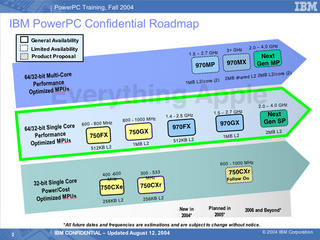
Despite the claim that the 970GX will have general availability in 2005, we have not yet had previous official confirmation of this chip. However, there has been an unofficial mention of the 970GX. Also, it remains to be seen whether or not the 970MX will ever see the light of day. In the meantime, we are still waiting the appearance of 970MP Macs, which I believe will become available within six months.
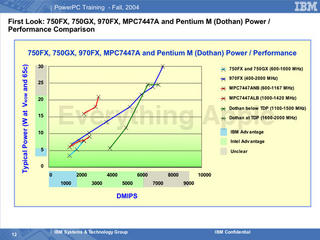
In terms of power specs, IBM claims that the G5 970FX is superior to Freescale's current G4 7447A at most clock speeds, measured by performance per Watt. What is interesting though is that even IBM concedes that Intel's Pentium M Dothan is superior with this measure at moderate speeds and possibly also at higher speeds. However, these power specs do not seem to include numbers for IBM's new low power G5 970FX. For example, the new 1.6 GHz low power G5 is listed at 21 Watts max, but the roadmap lists it at 31 Watts max, nearly 50% higher. Still, it is likely that Dothan still wins in terms of performance per Watt overall.

Despite the claim that the 970GX will have general availability in 2005, we have not yet had previous official confirmation of this chip. However, there has been an unofficial mention of the 970GX. Also, it remains to be seen whether or not the 970MX will ever see the light of day. In the meantime, we are still waiting the appearance of 970MP Macs, which I believe will become available within six months.

In terms of power specs, IBM claims that the G5 970FX is superior to Freescale's current G4 7447A at most clock speeds, measured by performance per Watt. What is interesting though is that even IBM concedes that Intel's Pentium M Dothan is superior with this measure at moderate speeds and possibly also at higher speeds. However, these power specs do not seem to include numbers for IBM's new low power G5 970FX. For example, the new 1.6 GHz low power G5 is listed at 21 Watts max, but the roadmap lists it at 31 Watts max, nearly 50% higher. Still, it is likely that Dothan still wins in terms of performance per Watt overall.
Subscribe to:
Posts (Atom)