Pro Tools, one of the flagship music applications on the Mac platform, has finally gotten support for Intel Macs. Intel Mac support was announced previously, but the downloads for Pro Tools LE 7.1.1 & Pro Tools M-Powered 7.1.1 were finally posted at Digidesign's website yesterday.
Interestingly, it is not a universal binary. The 7.1.1 update adds Intel Mac support, but only works on Intel Macs. Those with PowerPC Macs will continue to use version 7.1, which has identical functionality.
This is an important milestone for Apple, since previous versions of Pro Tools did not work on Intel Macs at all, even under Rosetta. Other major hurdles for Apple to overcome in this Intel x86 Mac transition are the universal binaries of Adobe Creative Suite 3 (which is not due until 2007), and QuarkXPress 7 (which is due in the second half of this year). Fortunately, these at least work in Rosetta, albeit slowly. Microsoft Office is also a flagship Mac program which is still running under Rosetta, but fortunately, speed in Office is not a critical issue for most people. Office performance on Intel Macs is slow, but it remains quite usable for most.
Wednesday, May 31, 2006
Sunday, May 28, 2006
MacBook & G5 iMac benchmarked: Handbrake, Aperture, and much more
 Now that I've had a few days with my MacBook with new RAM installed, I've been able to properly compare the performance in various applications on my my MacBook and my iMac G5. My MacBook has 2 GB of PC2-5300 RAM, an 80 GB 5400 rpm 2.5" drive, Intel GMA 950 graphics (using 64 MB system RAM), and a Core Duo 2.0 CPU. The iMac has 1.5 GB of PC-3200 RAM, a 500 GB 7200 rpm 3.5" drive, Radeon 9600 graphics (with 128 MB dedicated video RAM), and a G5 970FX 2.0 (single-core).
I was shocked and overjoyed to see just how well the MacBook performs in one of my favourite applications, Handbrake 0.71, which I use to convert DVD clips to H.264 for archival purposes. I tried encoding a 6:03 minute 4:3 640x480 clip of my friends and me jumping out of a plane (seriously), at 1000 Kbps main profile H.264 with video deinterlacing, and 128 Kbps 44100 Hz AAC audio.
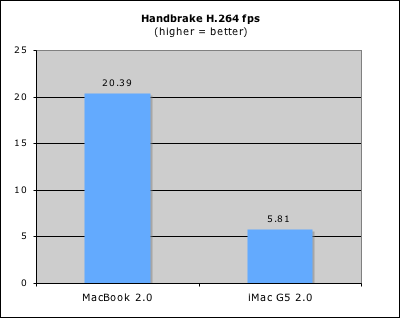
The above graph shows what Handbrake recorded as the average frame rate for the first pass of a two-pass encode. The iMac took just a shade over 25 minutes, whereas the MacBook took only 7 minutes and 15 seconds! In other words the MacBook has 350% the performance of the iMac, despite having only 200% of the CPU GHz.
Similarly, Aperture 1.1.1 shone on the MacBook compared to the iMac, despite the fact that Aperture is fully supported on the iMac and not on the MacBook.
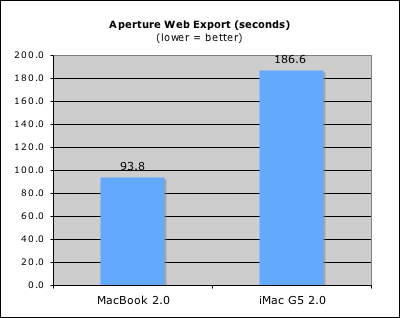
The Aperture test consisted of a web page export of a project I shot a few months ago at the local market. The pictures were mildly edited Canon 20D 8 Megapixel RAW files, exported to an HTML webpage from within Aperture. Despite the fact that the GMA 950 in the MacBook is terrible at 3D work, I suspect most of the export time (including RAW conversion) is CPU based, and of course the MacBook has CPU performance in spades. However, one should realize that my Aperture test included mainly only lightly edited pictures, which may not tax the GPU as much as heavily edited pictures. If one plans to use a laptop as a primary photo editing machine with Aperture, a MacBook Pro is thus recommended because GPU performance is still very important for optimal overall performance. Furthermore, a larger screen is easier to work with when using Aperture.
In Cinebench 9.5, the MacBook again flexed its CPU muscles.
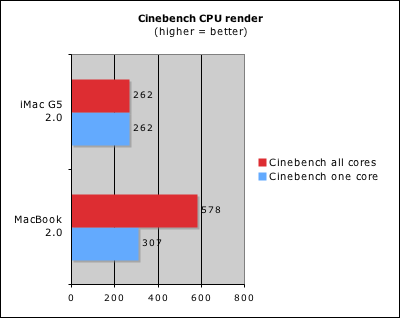
The MacBook was more than twice as fast at CPU rendering. However, things changed when 3D GPU performance became important:
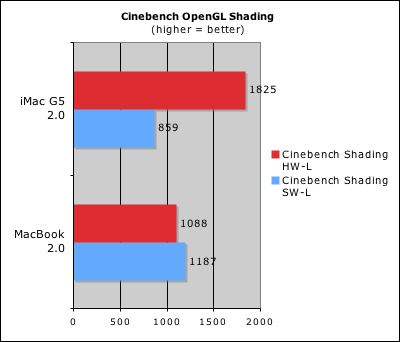
The MacBook did fine in the software OpenGL lighting test, but that's a CPU-based benchmark. When it came to the hardware OpenGL lighting test however, the MacBook fell far behind the iMac G5 with its Radeon 9600. The reason for this is that the MacBook's GMA 950 does not have hardware support for this function, and must therefore emulate it on the CPU. It actually did a little bit worse in its faked hardware score than its software score.
All of the above benchmarks are with applications that are native on both Intel and PowerPC, and which are able to leverage dual CPU cores. What about applications under Rosetta (which translates PowerPC instructions to x86 on-the-fly), and Rosetta on applications that are not well dual-optimized? Not surprisingly, the MacBook does extremely poorly in these types of applications.

One of the flagship applications on the Mac platform is Microsoft Office. I use PowerPoint 2004 a fair bit, and in this test I exported a 30 MB PowerPoint presentation (with lots of JPEG images) to a web page. In this particular test, the iMac is almost 3 times as fast as the MacBook. It took almost 2 minutes to do something that took only 41 seconds on the iMac. One can feel the difference in daily usage too, since application and file loading in Office on the MacBook as well as various other functions feel somewhat sluggish. Office is still quite usable on the MacBook though.
Finally, just for kicks, I ran Skidmarks GT 4.0.1, a PowerPC application found in the developer tools and used for quick and dirty PowerPC benchmarking:
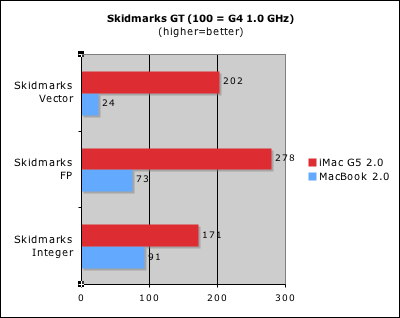
These scores seem to parallel the PowerPoint scores, with the iMac being roughly 2X-4X as fast as the MacBook in the non-vector benchmarks. Luckily, applications like those in MS Office aren't heavily dependent on Altivec for their functionality. While Rosetta does seem to support Altivec, it is very, very slow at it as would be expected under emulation.
Overall, the MacBook is an excellent machine for its pricepoint. It's a budget machine but with pro-level CPU power. The low end GPU can be problematic for some, but for many others it's not an issue at all. Rosetta is still a concern, but it's a concern not just with the MacBook, but with all Intel Macs. Fortunately, most of the big applications should be Intel native by next year, rendering the Rosetta issue moot. In the meantime, I'll be encoding quite a bit of H.264 video on my new laptop with Intel Inside™.
Friday, May 26, 2006
Reasonable Aperture 1.1 performance on MacBook
I mentioned earlier that the MacBook runs Aperture. I finally had a chance to install it on the MacBook, and the performance on the MacBook Core Duo 2.0 GHz is actually quite reasonable. In fact, it feels faster on the MacBook than it does on my iMac G5 2.0 GHz. The MacBook isn't exactly fast on edited photos, but the reason it feels faster than the iMac is due to the fact that RAW conversions are much faster. This is not surprising, considering that RAW conversions in Aperture are still CPU-based, and the Core Duo has roughly twice the raw processing power (forgive the pun) of a single-core G5 2.0.
The only issue is that Aperture 1.1.1 now gives a warning when the application is launched on the MacBook, saying that the minimum screen size supported is 1280x854. These screen size complaints are getting rather tiresome. First it was 1024x768, which is reasonable. Then it was 1280x780 for Aperture 1.1, and now it's 1280x854. Curiously, it seems like each time the minimum resolution increased, it was a direct response to low end Mac hardware that could run the program. The last iBook ran Aperture 1.0, so Apple upped the requirement to 1280x780 for Aperture 1.1. However, just a couple of weeks prior to the MacBook release, Apple then upped the requirement again in the Aperture 1.1.1 update to 1280x854, which of course is the resolution of the 15" PowerBooks and MacBook Pros. The good news though is that the warning in Aperture 1.1.1 is meaningless for MacBook users, since the program still loads and runs fine. By the way, despite all the revisions in stated minimum screen resolution requirements, the true minimum size has remained at 1000x685, even in the latest version of Aperture.
The only issue is that Aperture 1.1.1 now gives a warning when the application is launched on the MacBook, saying that the minimum screen size supported is 1280x854. These screen size complaints are getting rather tiresome. First it was 1024x768, which is reasonable. Then it was 1280x780 for Aperture 1.1, and now it's 1280x854. Curiously, it seems like each time the minimum resolution increased, it was a direct response to low end Mac hardware that could run the program. The last iBook ran Aperture 1.0, so Apple upped the requirement to 1280x780 for Aperture 1.1. However, just a couple of weeks prior to the MacBook release, Apple then upped the requirement again in the Aperture 1.1.1 update to 1280x854, which of course is the resolution of the 15" PowerBooks and MacBook Pros. The good news though is that the warning in Aperture 1.1.1 is meaningless for MacBook users, since the program still loads and runs fine. By the way, despite all the revisions in stated minimum screen resolution requirements, the true minimum size has remained at 1000x685, even in the latest version of Aperture.
Monday, May 22, 2006
MacBook: First impressions and 10 quick comments
My MacBook is still en route from Suzhou so I don't have it in my hands yet, but the good news is that it's already in the local FedEx sort facility so I should have it in a few days. In the meantime I checked out the MacBook at the local Mac store...
1) When I first looked at that MacBook on display, for a split-second I was confused as to why the OS looked so strange. Then I realized it was running Windows XP. :p For basic usage, Windows XP is very fast on the stock MacBook with 512 MB RAM, but Mac OS X often is not. With the additional RAM needed for the GPU and for Rosetta, Tiger is starved for memory. After loading several applications to memory, the MacBook needs to page out to disk, slowing the whole system down. While I consider 512 MB memory to be the minimum for a usable PowerPC Mac, I'd say the minimum for an Intel Mac with GMA 950 is significantly higher. 768 MB would probably be OK for basic usage, but unfortunately for video performance reasons, the MacBook needs paired RAM, and thus the minimum memory effectively becomes 1 GB.
2) The MacBook uses the Intel 945GM chipset.
3) Microsoft Word speed seems acceptable. It is not fast on the MacBook, but it is fast enough enough for everyday usage.
4) The glossy screen is very irritating to use under certain lighting conditions. In the store there was relatively bright overhead lighting and I had to keep moving the screen and/or my body position slightly to eliminate glare while still maintaining a good viewing angle. The glossy screen in my opinion is probably the MacBook's worst "feature", because of the glare. I do admit that the contrast is somewhat better than the old 12" iBook's screen, but that doesn't make up for the glare. Viewing angle on both screens are similarly poor.
5) The look of the black MacBook is quite nice. The matte black finish is very pleasing... until you see the fingerprints. The surface of the black MacBook looked like somebody had smeared grease all over it. And actually that's true... The grease from our human fingers was painfully and disgustingly obvious on the black MacBook. It was still there on the white MacBook of course, but it's much, much harder to see. For this reason, and along with the fact that the black MacBook costs significantly more, I think most people would be better off purchasing the white MacBook. The good news is that I did not see any flaking of the black finish, but I did not try to scratch the finish.
6) The MacBook does seem heavier and bulkier than the 12" iBook and 12" PowerBook, but that's not surprising since the MacBook is heavier and much wider. However, despite the greater weight, the 13" MacBook is actually smaller than the 12" iBook. Because the MacBook is much thinner (and sleeker looking) than the 12" iBook, it takes up less overall volume (2029 cubic cm) than the iBook (2242 cubic cm). However, it still takes up more volume than the 12" PowerBook (1820 cubic cm).
7) "Right-clicking" on the new MacBook: Sticking two fingers on the trackpad and then clicking the button brings up the contextual menu. This the best thing since sliced bread... Well, not quite, but it's certainly the best thing since two-finger scrolling (which was introduced on recent iBooks and PowerBooks). It's very intuitive, and it eliminates the requirement for an annoying second button, or use of a CTRL key.
8) The built-in iSight seems of reasonable quality. The camera is barely noticeable, but it is surprisingly effective despite its small size.
9) Contrary to popular belief, the keyboard spacing/sizing is normal, despite the different design and shape of the keys. The feel is a slight improvement overall, but nothing special in my opinion. It's mainly just different. It does look like it may not touch the screen though when the screen is closed. If true, that's is an improvement.
10) The SuperDrive in the MacBook I tested was the Matsushita UJ-857. It is the same 4X DVD-R 9.5 mm tall drive found in 15" MacBook Pros, and it does not support dual-layer burning.
By the way, it was interesting to see a young teenage customer in the store eyeing the MacBook, while clutching a copy of World of Warcraft. Fortunately, the salesperson eventually steered him away from the MacBook and pointed him towards the iMac.
Contrary to popular myth, gaming is very popular for customers in the iBook and MacBook market. It's reasonable not to expect a MacBook to run Quake 4 smoothly, but it's unfortunate that older generation games such as World of Warcraft can be still be problematic 2006 Mac hardware, especially when that hardware has such a fast CPU in the Core Duo. The option of a better GPU in a higher cost MacBook (like the black version) is still desirable. This would be the perfect machine for those in the market for a small portable machine and who do not wish to be forced to buy a desktop or a bigger, bulkier, and more expensive MacBook Pro.
1) When I first looked at that MacBook on display, for a split-second I was confused as to why the OS looked so strange. Then I realized it was running Windows XP. :p For basic usage, Windows XP is very fast on the stock MacBook with 512 MB RAM, but Mac OS X often is not. With the additional RAM needed for the GPU and for Rosetta, Tiger is starved for memory. After loading several applications to memory, the MacBook needs to page out to disk, slowing the whole system down. While I consider 512 MB memory to be the minimum for a usable PowerPC Mac, I'd say the minimum for an Intel Mac with GMA 950 is significantly higher. 768 MB would probably be OK for basic usage, but unfortunately for video performance reasons, the MacBook needs paired RAM, and thus the minimum memory effectively becomes 1 GB.
2) The MacBook uses the Intel 945GM chipset.
3) Microsoft Word speed seems acceptable. It is not fast on the MacBook, but it is fast enough enough for everyday usage.
4) The glossy screen is very irritating to use under certain lighting conditions. In the store there was relatively bright overhead lighting and I had to keep moving the screen and/or my body position slightly to eliminate glare while still maintaining a good viewing angle. The glossy screen in my opinion is probably the MacBook's worst "feature", because of the glare. I do admit that the contrast is somewhat better than the old 12" iBook's screen, but that doesn't make up for the glare. Viewing angle on both screens are similarly poor.
5) The look of the black MacBook is quite nice. The matte black finish is very pleasing... until you see the fingerprints. The surface of the black MacBook looked like somebody had smeared grease all over it. And actually that's true... The grease from our human fingers was painfully and disgustingly obvious on the black MacBook. It was still there on the white MacBook of course, but it's much, much harder to see. For this reason, and along with the fact that the black MacBook costs significantly more, I think most people would be better off purchasing the white MacBook. The good news is that I did not see any flaking of the black finish, but I did not try to scratch the finish.
6) The MacBook does seem heavier and bulkier than the 12" iBook and 12" PowerBook, but that's not surprising since the MacBook is heavier and much wider. However, despite the greater weight, the 13" MacBook is actually smaller than the 12" iBook. Because the MacBook is much thinner (and sleeker looking) than the 12" iBook, it takes up less overall volume (2029 cubic cm) than the iBook (2242 cubic cm). However, it still takes up more volume than the 12" PowerBook (1820 cubic cm).
7) "Right-clicking" on the new MacBook: Sticking two fingers on the trackpad and then clicking the button brings up the contextual menu. This the best thing since sliced bread... Well, not quite, but it's certainly the best thing since two-finger scrolling (which was introduced on recent iBooks and PowerBooks). It's very intuitive, and it eliminates the requirement for an annoying second button, or use of a CTRL key.
8) The built-in iSight seems of reasonable quality. The camera is barely noticeable, but it is surprisingly effective despite its small size.
9) Contrary to popular belief, the keyboard spacing/sizing is normal, despite the different design and shape of the keys. The feel is a slight improvement overall, but nothing special in my opinion. It's mainly just different. It does look like it may not touch the screen though when the screen is closed. If true, that's is an improvement.
10) The SuperDrive in the MacBook I tested was the Matsushita UJ-857. It is the same 4X DVD-R 9.5 mm tall drive found in 15" MacBook Pros, and it does not support dual-layer burning.
By the way, it was interesting to see a young teenage customer in the store eyeing the MacBook, while clutching a copy of World of Warcraft. Fortunately, the salesperson eventually steered him away from the MacBook and pointed him towards the iMac.
Contrary to popular myth, gaming is very popular for customers in the iBook and MacBook market. It's reasonable not to expect a MacBook to run Quake 4 smoothly, but it's unfortunate that older generation games such as World of Warcraft can be still be problematic 2006 Mac hardware, especially when that hardware has such a fast CPU in the Core Duo. The option of a better GPU in a higher cost MacBook (like the black version) is still desirable. This would be the perfect machine for those in the market for a small portable machine and who do not wish to be forced to buy a desktop or a bigger, bulkier, and more expensive MacBook Pro.
Sunday, May 21, 2006
More on MacBook Vista compatibility
 In the last article I commented on potential Vista compatibility for the MacBook and said that judging by the specs, the MacBook should support Aero Glass on Windows Vista. Some further points:
1) Intel recommends Core Duo with the Intel 945 series chipsets (which utilizes GMA 950) for Vista compatibility.
2) The Intel Mac mini uses Intel 945, and presumably so does the MacBook (although we have not yet received confirmation of this).
3) Intel already has written a WDDM driver for Intel 945 on Vista.
4) Despite the fact that OS X allocates only 64/80 MB of system RAM for use by the GPU on the Mac mini, Windows XP allocates 256 MB (provided one has enough system RAM), which is more than sufficient for Vista even with large screens. It is clear that the Mac mini's 64/80 MB GPU RAM limitation is not a hardware limitation.
5) Not only was there that video showing GMA 950 support, PC World also confirmed full Aero Glass functionality on an Acer laptop with Intel 945.
So far I have not seen anyone who has tested Vista on the MacBook, but I'm sure that will come soon enough. It would be nice if someone could at least test the MacBook with the Windows Vista Upgrade Advisor, but unfortunately the download is no longer available.
[Update 2006-05-22]
The Windows Vista Upgrade Advisor is now back up.
Also, I have now confirmed that the MacBook uses the Intel 945GM chipset (which is not big surprise considering that's the chipset found in the Mac mini, and we already knew that the MacBook has the GMA 950). Intel has this to say about the chipset and Vista compatibility: "Mobile Intel® 945GM Express Chipset family platforms using 512MB of system memory or greater meet all current requirements for the Microsoft Windows Vista* Capable PC program."
[Update 2006-05-22]
c|net weighs in:
Last week, Microsoft released a test version of its "Upgrade Advisor," a downloadable tool that aims to tell users how Vista-ready their system is.Screengrabs of the Windows Vista Upgrade Advisor running on incompletely supported PCs are here.
Ironically, the machine that was in the best shape for Vista, at least according to the tool, was a loaner Mac Mini with 1GB of memory. That system was Aero-ready, according to the tool, as long as I devoted more of the system's modest hard drive over to the Windows partition. It needed 15GB of the drive to be free, and most of the free space was over on the Mac side of the house.
Thursday, May 18, 2006
Windows Vista system requirements announced, MacBook fully supported
Microsoft today announced the system requirements for Windows Vista, its new operating system being developed to replace Windows XP:
What this means is that the new 13" MacBook should be fully supported as a Windows Vista Premium Ready PC... errr... Mac, as long as 1 GB or more RAM is installed. The MacBook's integrated Intel GMA 950 graphics has the required features for Aero Glass, which includes things such as translucent windows elements. Proving this is this video which demonstrates a beta version of Windows Vista running with full Aero Glass functionality on Intel GMA 950.
A Windows Vista Capable PC includes at least:
A modern processor (at least 800MHz).
512 MB of system memory.
A graphics processor that is DirectX 9 capable.
Windows Vista Premium Ready PCs
To get an even better Windows Vista experience, including the Windows Aero user experience, ask for a Capable PC that is designated Premium Ready, or choose a PC that meets or exceeds the Premium Ready requirements described below. Features available in specific premium editions of Windows Vista, such as the ability to watch and record live TV, may require additional hardware.
A Windows Vista Premium Ready PC includes at least:
1 GHz 32-bit (x86) or 64-bit (x64) processor.
1 GB of system memory.
A graphics processor that runs Windows Aero.
128 MB of graphics memory.
40 GB of hard drive capacity with 15 GB free space.
DVD-ROM Drive.
Audio output capability.
Internet access capability.
Windows Vista Capable and Premium Ready footnotes
Windows Aero requires:
DirectX 9 class graphics processor that:
Supports a WDDM Driver.
Supports Pixel Shader 2.0 in hardware.
Supports 32 bits per pixel.
Adequate graphics memory.
64 MB of graphics memory to support a single monitor less than 1,310,720 pixels
128 MB of graphics memory to support a single monitor at resolutions from 1,310,720 to 2,304,000 pixels
256 MB of graphics memory to support a single monitor at resolutions higher than 2,304,000 pixels
Meets graphics memory bandwidth requirements, as assessed by Windows Vista Upgrade Advisor running on Windows XP
What this means is that the new 13" MacBook should be fully supported as a Windows Vista Premium Ready PC... errr... Mac, as long as 1 GB or more RAM is installed. The MacBook's integrated Intel GMA 950 graphics has the required features for Aero Glass, which includes things such as translucent windows elements. Proving this is this video which demonstrates a beta version of Windows Vista running with full Aero Glass functionality on Intel GMA 950.
Subscribe to:
Posts (Atom)